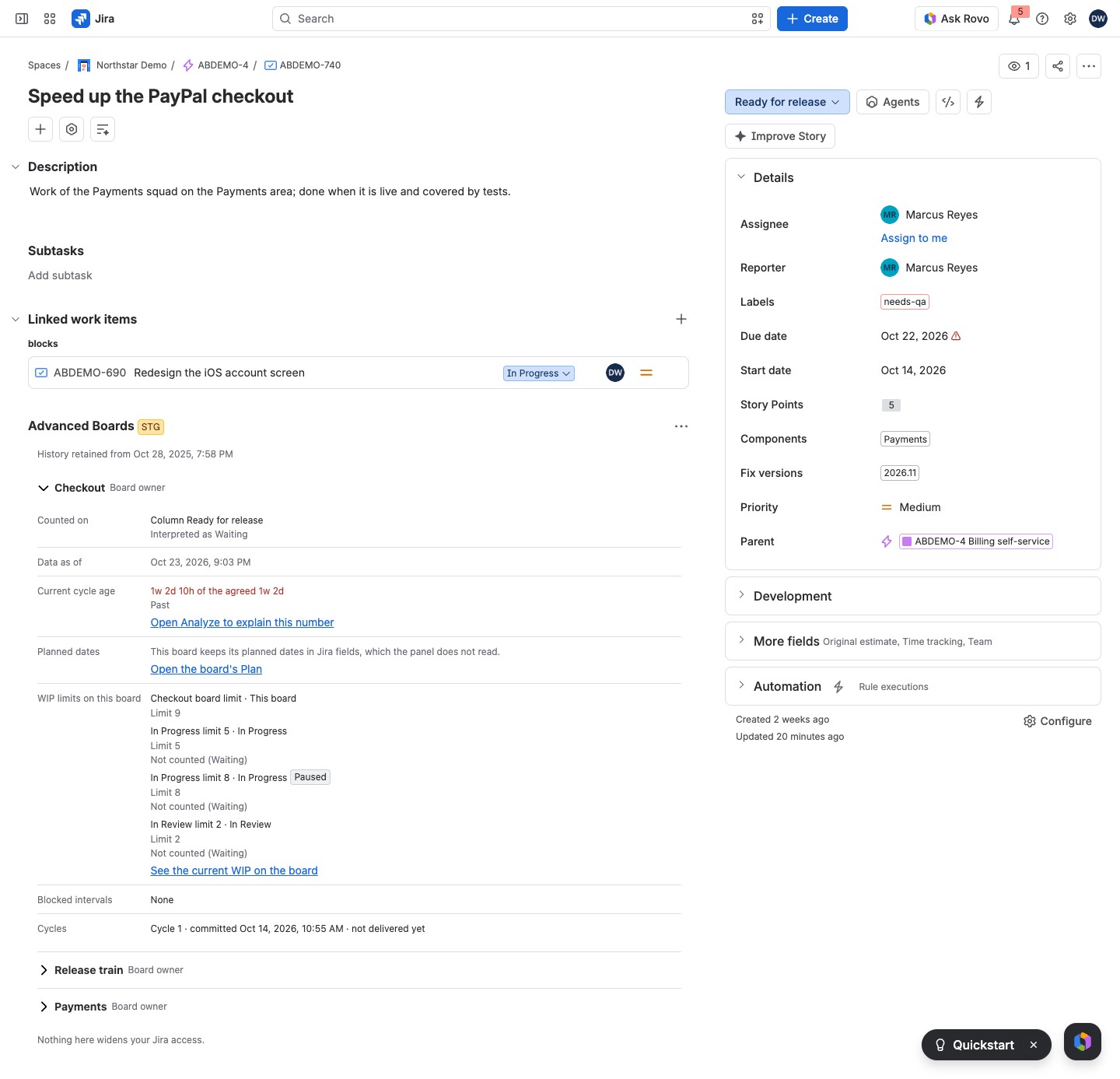
The work item panel shows, on a Jira work item, how each of your boards sees it: its column, its age against the agreed SLE, the WIP limits it counts toward, its blocked time and its cycles.
Open the panel #
Jira shows the panel on a work item once someone has added it (Installation).
- Open a work item in Jira.
- If the panel is not there yet, select Advanced Boards among the work item view’s app buttons, or in its apps menu. This adds the panel to that one work item. You need permission to edit the work item.
A Jira administrator can choose Show for all work items in the panel’s menu, and Hide from all work items to undo it.
The panel needs no other setup. It lists up to 5 boards that hold the work item and on which you hold a role; a line such as “2 more boards you can see hold this item” counts the rest. A Jira administrator sees every board. Nothing here widens your Jira access.
A yellow lozenge at the top marks a work item that is “Deleted in Jira”, “Archived in Jira”, “Access lost” or “Not confirmed”. Another yellow lozenge marks the history: “History partial”, “No status change” or “History unknown”. A line such as “History retained from Oct 1, 2025” says how far back it goes.
- Deleted in Jira, Archived in Jira, Access lost and Not confirmed: Jira no longer confirms the work item to the board as it was read, so no WIP number counts it.
- History partial: the app keeps only part of the work item’s history, so an age or a cycle that began earlier is not fully known.
- No status change: the history is whole, and the work item has never changed status, so it has entered no cycle.
- History unknown: the app cannot say how much of the work item’s history it keeps.
What each board’s section shows #
Each board has a section under its name and your role. The first is open; select a name to fold one. A lozenge beside the name says when the figures are behind the board:
- Import failed, Reindex failed or Refresh failed: red; the last refresh failed and none has worked since, so the figures are the last update’s, and the (i) beside Data as of says when.
- Out of date: yellow; the board’s settings changed after its figures were calculated.
- Calculated before a correction: yellow; a fix to the calculation rules waits for the next recalculation, and the (i) beside Data as of names the date and the fix.
| Row | What it says |
|---|---|
| Counted on | A column, such as “Column In Progress”, or “On no column of this board”. Drawn on replaces the label when no WIP number counts the work item: it is not committed yet or already delivered, or the board leaves it out, such as for its type or because Jira no longer confirms it |
| Data as of | When this board’s figures were taken; an (i) beside it says when the last refresh failed or the figures wait for a recalculation |
| Current cycle age | An age, such as “4d 2h of the agreed 6d”, in red when Past, amber when Approaching, gray when Unknown and in plain text when Within, with the state under it; or “No open cycle” |
| Planned dates | Start and end from the board’s Plan, as “start → end”, with “Not planned” for a date the plan does not hold, or “Not in this board’s plan”; a line under the dates says where they come from, such as “App-owned planning dates, not Jira fields” |
| WIP limits on this board | Each limit with its band, and “Paused” where its owner switched it off; “No WIP policy yet” where there is none |
| Blocked intervals | When an open block began and why it holds, “None”, or the closed blocks totaled |
| Cycles | Each cycle of the work item, newest first |
An age is Within while it is under 80% of the agreed SLE, Approaching from 80% up to and including the SLE, and Past once it is longer than the SLE. Unknown is never a breach: the commitment came before the kept history. The SLE is set in Calendar, service levels and classes of service.
A line under the column names the state class, such as “Interpreted as Active”. Where the flow reads the work item as another class than its status maps to, the line names both, such as “Interpreted as Waiting; the Jira status maps to Active”. Open Analyze to explain this number sits beside the age (Flow metrics in Analyze).
When the age cannot be given, the panel says “Age unknown: the commitment is outside retained history”: the commitment came before the kept history. When the age is given but cannot be compared with an SLE, the line under it says why:
- “SLE not set; comparison not performed.”: no SLE is agreed.
- “Several classes of service are agreed and nothing stored says which one an item is in.”: the board agrees several classes and the work item’s class is not known.
Limits, blocks and cycles #
The last three rows hold the most detail: which limits count the work item, why it is blocked, and each of its cycles. They are explained in Limits, blocks and cycles in the work item panel.
What sets these rows #
A Board owner sets each row’s source in the board. The column comes from Configure → “Layout & cards” (Columns, lanes and cards). The state class and what marks a block come from “Flow & time” (Flow, boundaries and blockers, Blockers and excluded resolutions). The agreed SLE comes from “Flow & time” too (Calendar, service levels and classes of service). The limits come from “Policies & agreements” (Policies and WIP limits), and the planned dates from Plan (Timeline, milestones and dependencies). The panel has no export.
If something looks off #
- “On none of your boards”: no board you hold a role on holds this work item, so select Open your boards.
- “This status is on no column of this board. It is still counted.”: a Board owner maps the status under Configure → “Layout & cards”.
- “This status is on no column of this board. No WIP number counts this work item, which is not committed or is already delivered.”: nothing to fix; the work item is drawn but not counted.
- “This board keeps its planned dates in Jira fields, which the panel does not read.”: select Open the board’s Plan under it to see the dates.
- “This board’s planning settings could not be read, so no planned date is stated.”: reload the work item page, or open the board’s Plan.
- “This work item is on more boards than one read considers.”: more than 50 of your boards hold it, so open the board you need from the Boards directory.
- “No work item to show”: reload the work item page.
- “The license is inactive”: the panel shows no board while the site has no active license; a Jira administrator checks the license in Administration (Standard and Advanced editions).
- “Waiting for Atlassian to confirm this site’s license”: select Try again after a while; the panel shows your boards once Atlassian answers.


