Layout & cards decides how Work looks: its columns, its swimlanes and what a card shows. You arrange the board so your team reads it at a glance. Nothing here changes a count.
Open Layout & cards #
- Open the board and select Configure.
- Choose Layout & cards.
The group holds four cards, in this order: Columns, Swimlanes, Cards and Work views. Columns, Swimlanes and Cards each have their own save button; Work views saves in its dialogs. Where the board’s governance asks for one, a save of Columns, Swimlanes or Cards also asks for a Reason for the change: fill it in before you save. Where governance locks the layout, the save button stays held and its tooltip says why (Governance and reasons for a change).
Columns and column groups #
Each status of the board’s flow is drawn in one column. Choosing a status that another column draws moves it: in the Statuses list it reads like “Backlog · now in Ready”. A line reading “Statuses in no column” lists any left over; put every status in a column before you save.
The Columns table lists each column in board order: its Column name, the Statuses it draws and its Group. The Column groups table lists each Group with its Columns as a run from the first to the last. A Viewer or a Member sees both tables without the row menus and the add buttons.
- Add column: enter a Name and choose its Statuses.
- A row’s menu: Rename column, Edit statuses, Move column up, Move column down and Remove column.
- With no group yet, the card reads “No column groups. Add one to collapse a run of side-by-side columns into one on Work.”
- Add group: a column group is a run of side-by-side columns that Work can collapse into one. Enter a Name, then choose the First column and the Last column. A column belongs to one group.
- A group’s menu: Rename group and Remove group.
A board holds up to 50 columns and 20 groups. Select Save columns to keep the change. Status classes are set in Flow, boundaries and blockers.
If a save removes a column or group that something still names, the dialog “Remove columns or groups” lists what names it under WIP policies, Rules (Advanced edition) and Views. If the list is cut short, it says “More exist beyond this list.” They stop applying, and stay so even if you add a column of the same name later. Select Save columns in the dialog to confirm. The change is recorded in the board’s history.
Swimlanes #
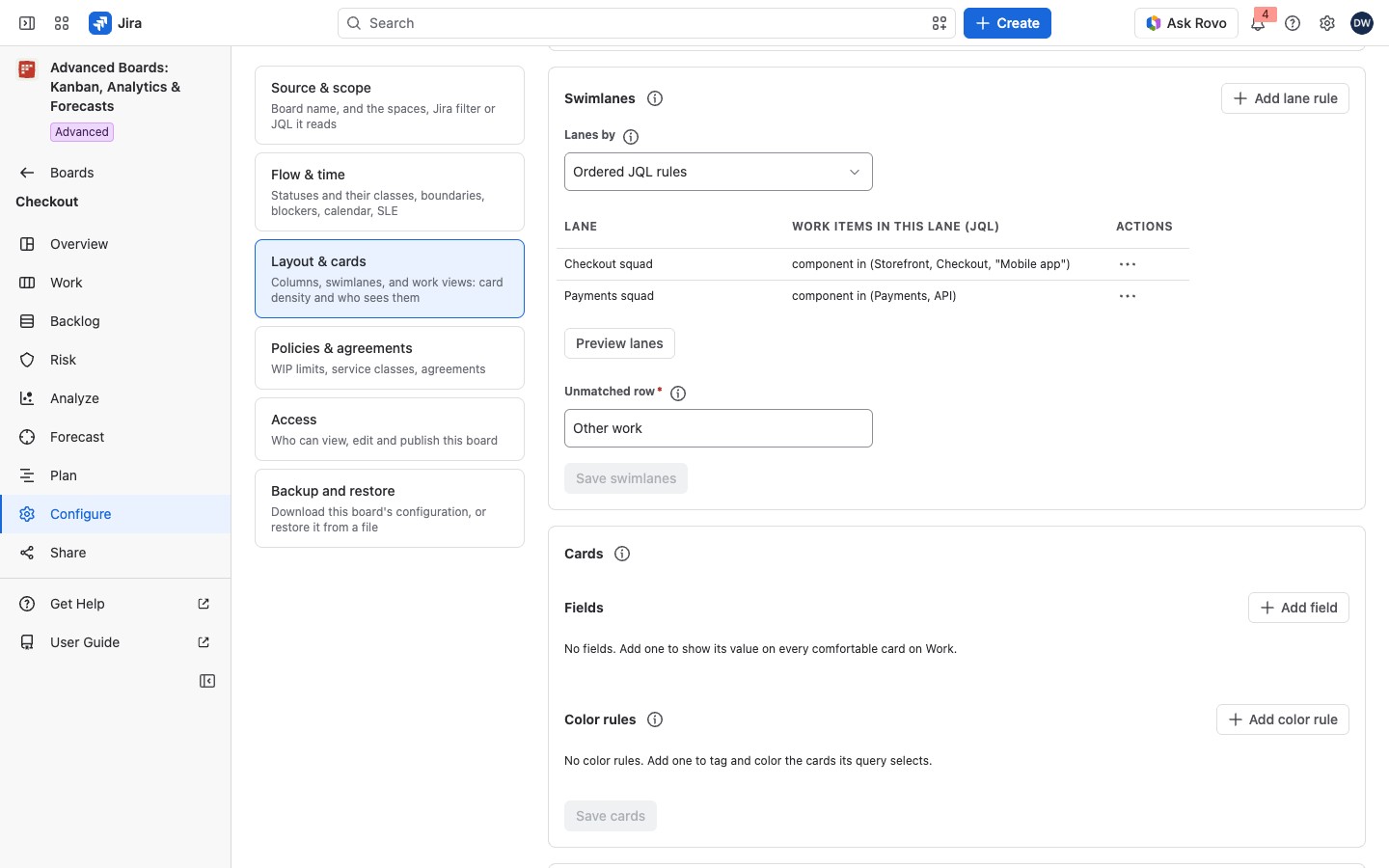
Choose how lanes are drawn in Lanes by:
| Option | What it draws |
|---|---|
| No swimlanes | One board with no lanes |
| Space, Work item type, Parent, Assignee | A lane for each value the work items have |
| Ordered JQL rules | A lane for each rule, up to 20; a work item goes to the first rule that takes it |
With Ordered JQL rules and no rule yet, the card reads “No lane rules yet. Add the first rule: the work items its query selects go to its lane.” Select Add lane rule and enter the Lane and Work items in this lane (JQL). A lane’s name can be up to 120 characters and its query up to 1,000. A rule’s query can’t carry an ORDER BY of its own. Select Add to keep a new rule, or Update when you edit one. A rule’s menu holds Edit lane rule, Move lane up, Move lane down and Remove lane rule. If you then choose another Lanes by option, the save removes the stored rules, and a warning says so first. Choose Ordered JQL rules again before you save to keep them.
Work items no lane takes are drawn in the unmatched row, and still count in the board’s WIP. The Unmatched row field holds that row’s label: “Other work” by default, “Unassigned” for lanes by assignee. Change it to a name your team uses, up to 60 characters. It can’t be empty: Save stays held until the row has a label.
Select Preview lanes to count the lanes without saving: the Lane preview table (Lane, Work items) counts each rule’s work items and the unmatched row’s, over the work items you can see, as of the board’s last refresh. If Jira refuses a rule, the preview names it and counts no later rule and no unmatched row. Then select Save swimlanes.
Saving a new way of drawing lanes recalculates the board, so every work item is placed in its lane again; no count changes. Until the recalculation finishes, Work says so. After lanes are added or changed it draws no lanes yet: “Swimlanes were added to this board and it is being recalculated: Work draws the lanes once the recalculation finishes.” or “This board’s swimlanes were changed and it is being recalculated: Work draws the new lanes once the recalculation finishes.” After lanes are removed it reads “This board’s swimlanes were removed and it is being recalculated: Work already draws the board without lanes.” If a WIP policy would limit nothing after the save, the Change swimlanes dialog opens first. That happens when you choose another Lanes by option over lanes drawn by space, work item type, parent or assignee, or when you remove a lane rule. The dialog lists those policies under WIP policies, and says “More exist beyond this list.” when the list is cut short. For lanes drawn by a value, it says the policies limit nothing after the save and apply again if the board returns to that way of drawing lanes. For a removed rule, it says they stay so even if a rule of the same name is added again. It ends “The change is recorded in this board’s history.” Select Save swimlanes in the dialog to confirm, or Cancel.
A lane query is checked as you. It can’t use currentUser(), or anything that moves without the work item changing: a date such as now() or -7d, openSprints(), linkedIssues(), or branches, watchers and votes. A saved filter the query names is copied in as it stands when you save. Each later Save swimlanes copies every rule’s filters in again as they stand then. With nothing changed, Save swimlanes stays held (“Nothing to save: these swimlanes are exactly the ones stored.”), so a later change of a filter reaches the lane only with your next change to the swimlanes.
What a card shows #
The Cards card sets the fields a comfortable card shows on Work and the color rules that tag cards. A compact or dense card shows only the color tag; the fields stay available to a screen reader. No count changes. The card is explained in Card fields and color rules.
How the layout reaches Work and your policies #
Work draws the columns, column groups and lanes you set here. A WIP policy can limit a column, a column group, a swimlane or a cell, so add the column group or the lanes here first. A policy that names a column, group or lane the layout no longer has limits nothing. Policies are explained in Policies and WIP limits.
If something looks off #
- “This column draws no status. Edit its statuses, or remove it.”: give the column a status, or remove it, before you save.
- “Another column already has this name.”: give each column and group its own name.
- “This query compares with today’s date, such as now(), startOfDay() or -7d, so its lane would change without the work item changing and could hold work items that no longer match. Use a fixed date, such as 2026-01-31, or a field the work item carries.”: rewrite the lane rule with a fixed date.
- “Lane rule 2, Payments squad, could not be read: Jira refused its query when this board was last refreshed, so that lane and every lane after it hold no work items, and the work items they would hold are in the unmatched row. Edit the rule and save the swimlanes.”: edit the rule’s query, then select Save swimlanes.
- “This column draws a status the board’s flow no longer maps. Edit its statuses.”: choose the column’s statuses again, then save.
- “This group’s columns no longer stand side by side. Move them together, or remove the group.”: move the columns back together, or remove the group.
- “A board can have at most 50 columns.”: remove a column before you add another.
- “A board can have at most 20 column groups.”: remove a group before you add another.
- “The statuses of the board’s flow could not be read.”: select Try again where the card offers it, or reload the page; Save stays held until the statuses are read.
- “The board’s stored columns could not be read, so they cannot be edited here.”: reload the page.
- “The board’s stored swimlanes could not be read, so they cannot be edited here.”: reload the page.
- “Jira does not accept this query as you: its syntax is wrong, or a field or a value in it does not exist or is not visible to you.”: correct the lane rule’s query, then save again.
- “This query names a saved filter you cannot use: one that does not exist or is not shared with you, one named instead of given by its ID, or one that holds only a sort order.”: name a filter shared with you by its ID, or write the query out.
- “This query uses a function, such as currentUser(), that answers differently for each person reading the board.”: use a field the work item carries instead.
- “A lane’s query selects work items and carries no ORDER BY of its own.”: remove the ORDER BY from the rule’s query.
- “This query uses a function this app has not confirmed answers the same for every person reading the board.”: use a field the work item carries instead.
- “This query names a saved filter that refers back to itself.”: edit the filter so it no longer names itself, or write the query out in the rule.
- “This query’s saved filters refer to further saved filters more deeply, or more often, than a lane’s query may.” or “This query refers to a saved filter in a way that keeps the filter’s own query from being copied into the lane’s.”: write the query out in the rule.
- “With its saved filters copied in, this query is too long for a lane.”: shorten the query, or name fewer saved filters.
- “This query depends on which sprints are open or which versions are released, such as openSprints(), …”: name the sprint or version itself, or use a field the work item carries.
- “This query reads something Jira keeps beside the work item, such as its branches, commits and pull requests, watchers, votes or when it was last viewed, …” or “This query depends on other work items, such as linkedIssues(), …”: use a field the work item carries.
- “Another lane already has this name.”: give each lane its own name.
- “Lane rule 2, Payments squad, could not be checked: …”, followed by “Later rules and the unmatched row were not counted.” or “The unmatched row was not counted.”: correct the rule named, then select Preview lanes again.
- “This board’s work items have not been read yet, so the lanes cannot be counted now.”: select Preview lanes again after the board’s first import.
- “The count of these rules did not finish, so no lane was counted.”: select Preview lanes again.


