Every screen that shows a figure carries a thin strip above it. The strip tells you how fresh the data is, when your access was checked and how much of the board it counts.
What the strip says #
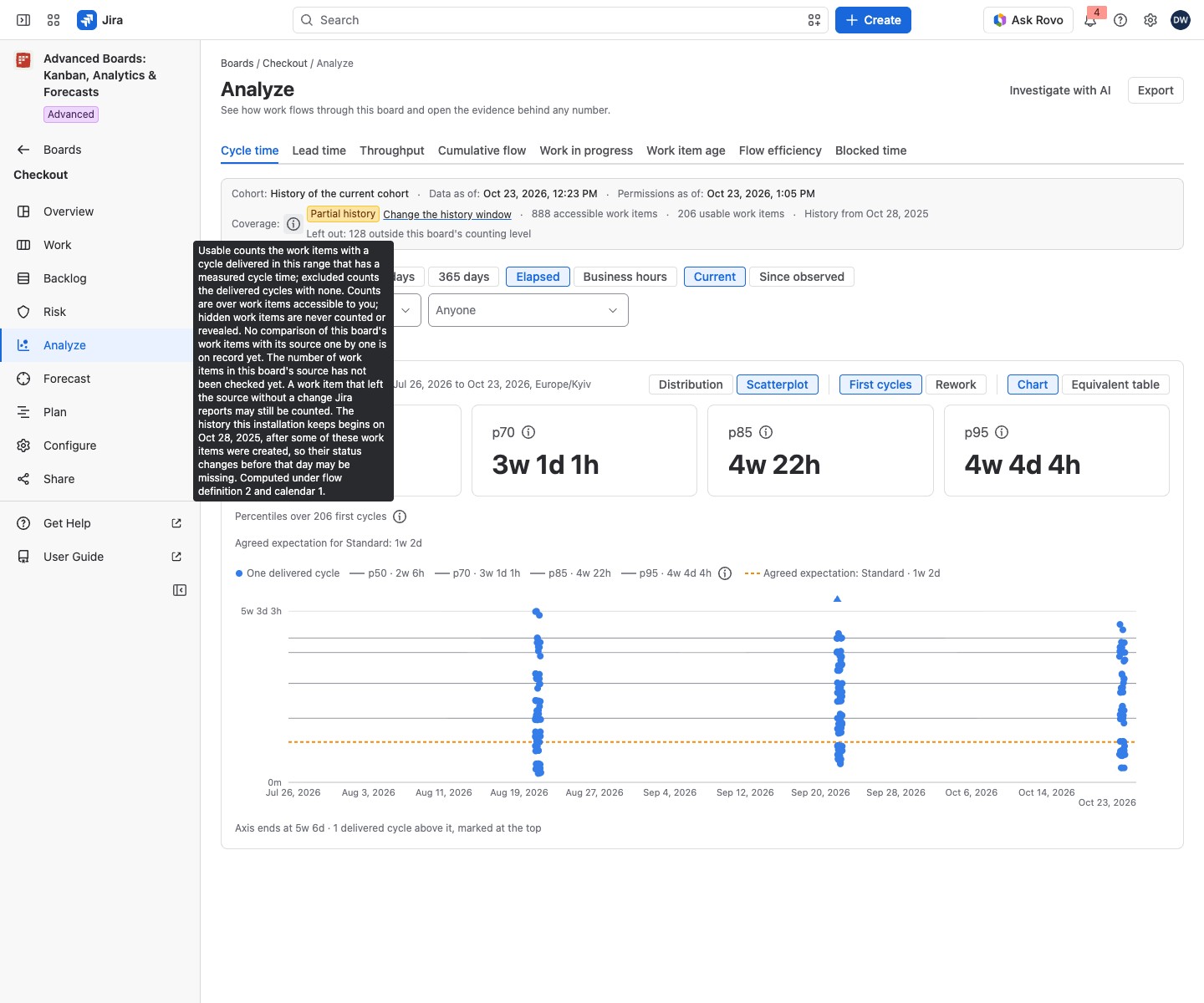
The facts sit on one line, separated by dots. A screen shows only the facts it has, and a strip with no fact is not drawn.
- Data as of: the moment the numbers you see were taken. It is not the moment you opened the page.
- Permissions as of: the moment the app last checked what you may see. A screen that combines several reads shows the oldest of their checks.
- Coverage: how many work items the figures count, such as “713 accessible work items, all usable”. It counts only the work items you can see in Jira. Hidden work items are never counted or revealed.
- Cohort: a chip, but only where the cohort changes on that screen. Where it never changes, one sentence in the Coverage (i) states it.
Select the (i) beside Coverage, named “About these counts”. It says what “usable” and “excluded” count on that screen, and which flow version and calendar version the figures were computed under. It also names the time zone the days were counted in.
It adds two checks of the source:
- when the board’s work items were last compared with the source one by one;
- when the number of work items in the source was last checked.
A work item that leaves the source without a change Jira reports can stay counted for up to a week. Where the one-by-one comparison cannot run, the (i) says it may still be counted. On a screen with a shared limit, the (i) also says how many of the boards that limit names have not published yet or could not be measured.
Where a strip shows no coverage, the same facts sit in an (i) “About this data” beside Data as of.
When coverage is partial #
A lozenge appears beside Coverage only while the coverage is incomplete. It reads “Partial”, or “Partial history” on screens that count history. A complete or unknown coverage draws no lozenge, only the counts.
Partial history means the app keeps history only from a set day. Work items created before that day may miss earlier status changes, so their figures can be short. The (i) names the day. An administrator also sees Change the history window beside the lozenge, which opens Data retention and deletion. Anyone else reads who sets it.
The coverage also reads “Partial” while the board holds work items that Jira no longer confirms: the app could not confirm them at the last refresh, or it lost access to them. The (i) then gives that one cause, with no count. On Analyze it reads “The board holds work items that Jira no longer confirms, and this answer may count them. The app could not confirm them at the last refresh, or lost access to them.” A forecast run and a backtest say the same of the moment they were computed.
The line can also hold “usable” and “excluded” counts, and on Work “In the current filter” and “read for this page”. History from gives the first day the app keeps. Stale since gives the time from which the data is stale. On Work, the strip stands under the board, and moves above it while the data is stale or the latest refresh failed. On the other screens it always stands above the content. A work item with no class of service is counted and stated apart, never excluded.
Classification #
Where a figure is compared with a class of service’s agreed expectation (on Analyze, in its evidence panel and in a WIP figure’s explanation), a Classification line shows how the work items were placed:
- Mapped by a rule: a class rule placed them.
- Took the default class: no rule matched, so they took the default class. Without a default they read “unclassified”.
- Unresolved: the class could not be read. The reason follows, such as “a class rule could not be evaluated as you” or “no reader’s rights were available to evaluate a class rule”.
When a refresh failed #
A red lozenge, Import failed or Reindex failed, appears beside the times. The latest refresh published nothing, so the screen still reads the last data the board took in. The time under Data as of does not move. The (i) “About the failed refresh” says when it failed. A Board owner and an administrator also read there why it failed. An administrator can select Open the job for the details in Imports and jobs. Anyone else reads who can open the job.
Work items the board does not analyze #
On Work, Backlog, Analyze and Forecast, a line can read “Some work items you can see in Jira are not in this board’s analysis: the app cannot read them.” It appears only when the app finds such a work item.
Select Show them to list up to 100 as Jira shows them to you. Each carries the label “History unavailable for analysis”. If Jira holds more, the list says so. If Jira no longer shows you any such work item, the list reads “Jira no longer shows you a work item here that the app cannot read.”
If something looks off #
- “Not recorded”: the screen asked for a time and has none, so no figure should be read as fresh.
- “These work items could not be listed”: the read did not finish. Select Try again in the list.
Related #
- Flow metrics in Analyze: the metric tabs the strip sits on.
- Current risk signals and Read a forecast result: the strip on signals and on a run.
- What each person sees: why two people can see different counts.


