Advanced Boards comes in two editions, Standard and Advanced, in one app. Your site’s Marketplace license decides which one you get. Nobody switches it inside the app, and every person on the site gets the same edition.
What each edition includes #
Standard holds the whole daily work of a board. That is WIP limits and policies, moving cards and editing work items in Jira, and flow metrics in Analyze. It also holds both forecast questions, Plan, stakeholder views, Reports, the four dashboard gadgets and Administration. Creating boards, the Backlog, batch actions and the current risk signals on Risk are Standard too. Advanced adds the alerts that a rule raises, not the signals themselves. Advanced includes all of Standard and adds work across boards and over time.
| Advanced feature | What it is for | Where it is explained | What a Standard site sees |
|---|---|---|---|
| Portfolios and value streams | Read several boards as one, and see where work waits between teams. Example: the portfolio Northstar rollout reads Checkout, Payments, Platform team and Release train as one, and its value stream Checkout to Release train shows how long work waits between those two boards. A portfolio has the tabs Overview, Value streams, Roadmap and Packs. A manager also sees Settings, where boards are added and removed. You need the Board owner role on every board you add | Portfolios, Value streams, Portfolio roadmap and stakeholder packs | No Portfolios entry in the navigation. Portfolios, their value streams and the stakeholder packs you already have stay readable and can be deleted. A portfolio link in Reports opens them |
| Continuous forecasts | Run a forecast on a cadence, and see how its answer moved. Example: a weekly schedule on Release train runs its forecast again, and its run history shows how the date moved. It holds the Schedules tab of Forecast, its tiles, the schedule editor and each schedule’s run history | Forecast schedules | The Schedules tab opens. Existing schedules stay readable and read “Paused: this installation does not run the Advanced edition.” None runs, and no new one starts. A Board owner can delete one |
| Backtesting and calibration | Check how often past forecasts came true at the probability they stated. Example: a backtest on Checkout replays past forecasts, and its observed hit rate shows how often the dates given at 85% held. It holds the Calibration tab of Forecast, the backtest dialog and the saved backtests | Forecast calibration | The Calibration tab opens. Saved backtests are readable. New ones pause |
| Scenarios | Try a change of plan on a copy, and compare the dates before you commit. Example: clone the baseline Autumn release, add the epic Wallet payments to the clone and compare the 85% dates. It holds the directory, the scenario editor, Baseline vs scenario and the Apply-plan preview | Scenarios & improvement, Build a scenario, Scenario results and the apply plan | No “Scenarios & improvement” entry. Its directory still lists your scenarios at its own address, such as a link you saved. Each stays readable, can be deleted, and its runs exported |
| Policy experiments | Compare a board’s history before and after a change you made, such as a lower WIP limit. Example: the experiment In Progress limit from 8 to 5 compares Checkout’s cycle time before and after the lower limit. It holds the experiment editor with its two windows and the comparison | Policy experiments | With none kept, the page shows About the Advanced edition. Kept experiments stay readable and can be deleted, and a saved comparison stays readable while it is kept. New experiments, edits and new comparisons need Advanced |
| Risk rules with ownership and acknowledgment | Turn risk signals into alerts that a named person owns. Example: the rule Aging past the SLE raises an alert when a Checkout work item passes its SLE, and the rule’s owner acknowledges it. An administrator sets the one percentile that rules compare with in Administration → Risk automation | Risk rules, Risk alerts, Risk automation | Rules raise nothing new. They stay readable, and a Board owner can delete one. Risk keeps its Alerts tab, which reads “Rules evaluate on the Advanced edition. On this edition they are paused and nothing new is raised; the alerts below were produced under the Advanced edition and stay readable.” The Risk automation section leaves Administration |
| AI investigation | Ask a question about one board, and get an answer that cites its evidence. Example: in Checkout’s Analyze, ask why throughput fell; the answer cites the figures it rests on. It is off until a Jira administrator turns it on in Administration → AI investigation, where the same person sets a daily and a monthly cap | AI investigation, AI investigation settings | Investigate with AI stays in Analyze and opens the earlier threads, which are readable. New questions pause. The AI investigation section leaves Administration |
| Process templates and governed approval | Copy one board’s settings into a template that an approver reviews. Example: copy Checkout’s flow and calendar into the template Northstar team flow, and Ellen Brooks approves it. An administrator sets which boards the site rules bind, and who approves, in Administration → Governance | Templates, Governance | No Templates entry in the navigation. The Templates directory still lists the templates you kept, at its own address, such as a link you saved. A template’s owner can delete one. Creating, editing and rolling out a template need Advanced |
| Batch rollout | Write a published template to many boards after a dry run, and roll a board back. Example: after a dry run, write Northstar team flow to Platform team and Support triage, and roll one back if needed. It holds the rollout page with its dry run, the status and field mapping, the change manifest, apply and roll back | Roll out a template | The rollout page shows About the Advanced edition. A deployment’s page stays readable. Retrying and rolling back a deployment need Advanced |
| Priority support | Requests from an Advanced site go to the vendor’s priority queue. Example: Dana Whitfield builds a support bundle in Administration → Support and diagnostics and attaches it to a ticket opened through Get Help; the bundle names the support tier, so the vendor can route the request | Pricing and Licensing, Support and diagnostics | The same steps; the bundle names the Standard tier. Nothing else in the app changes |
What Standard shows in place of Advanced features #
You won’t meet disabled Advanced controls scattered through your daily screens. A control that needs Advanced is absent. These entries stay: the Schedules and Calibration tabs of Forecast, Investigate with AI in Analyze, and the Alerts tab and Manage rules on Risk.
With nothing kept, the Schedules and Calibration tabs of a board’s Forecast show “This is part of the Advanced edition”, a sentence about the feature and About the Advanced edition. Rules, Templates, Policy experiments, Scenarios, Portfolios, a rollout and AI investigation show the About the Advanced edition page itself in their place. The Administration sections AI investigation and Risk automation leave the section list; a saved link to either opens the same page.
Governance stays in Administration on Standard too. While its site rules govern a board, they still apply. On Standard a save can only lift them: lower a level or take boards out of the scope. Stricter rules, more boards and changes to the approval need Advanced. With no board governed, the section shows About the Advanced edition.
A page or tab that holds earlier results shows them. Each carries the lozenge Retained result: produced under the Advanced edition. It is yellow on schedules, backtests, investigations, portfolios and scenarios, purple on a rule or a template, and gray on a policy experiment. One sentence says what is paused.
The About the Advanced edition page #
On Standard, the rail’s “Advanced edition” group holds one entry, About the Advanced edition. It holds the same one entry while the license is inactive or not yet confirmed. On Standard, the License and editions card in Administration → Overview has an About the Advanced edition button too. On an Advanced site, the same group lists Portfolios, Scenarios & improvement and Templates, and has no entry for the About page.
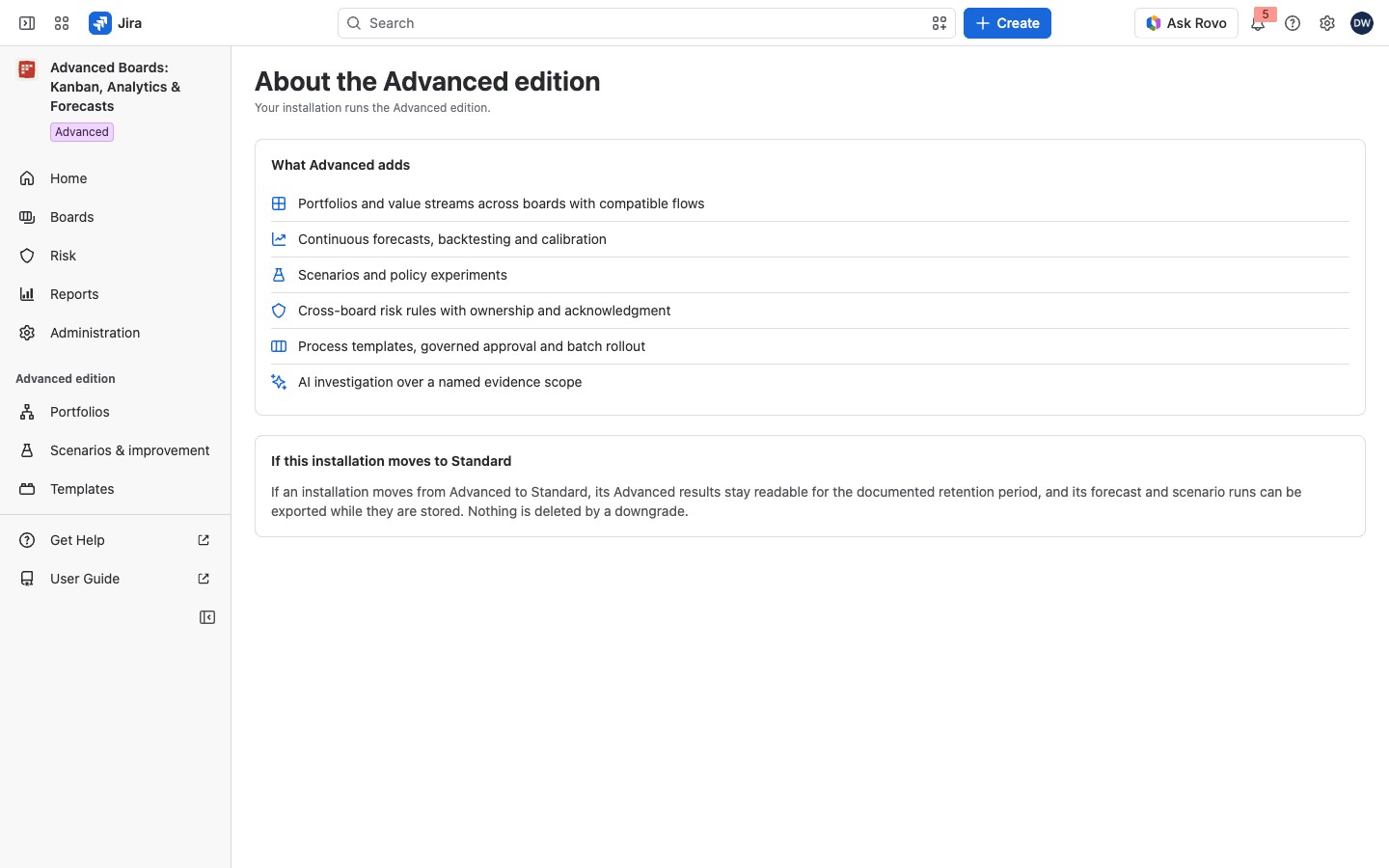
On its own page, and where it stands in place of AI investigation in Analyze, the line under the page title names your edition:
- “Your installation runs the Standard edition.” or “Your installation runs the Advanced edition.”
- “This installation has no active license, so no edition is unlocked.” when the license is not active.
- “Waiting for Atlassian to confirm this site’s license.” while Atlassian has not answered.
While the app has not yet read your edition, that line holds the sentence below instead.
Wherever else the page stands in place of a feature (Rules, Templates, Scenarios, Portfolios, Policy experiments, a rollout, Governance and the Administration sections), the line holds only that sentence: “Advanced adds portfolios, continuous forecasts, calibration, scenarios, risk automation, process templates and AI investigation.” The card What Advanced adds has six rows, each with an icon: “Portfolios and value streams across boards with compatible flows”, “Continuous forecasts, backtesting and calibration”, “Scenarios and policy experiments”, “Cross-board risk rules with ownership and acknowledgment”, “Process templates, governed approval and batch rollout” and “AI investigation over a named evidence scope”. The rows are a short list, not links. The last row means that each answer rests on a named set of evidence: the board, its flow and calendar versions and the two instants in the strip above the question, limited to what you can read in Jira.
A second card sits below it, titled If this installation moves to Standard. It says Advanced results stay readable for the documented retention period. It also says forecast and scenario runs can be exported while they are stored, and a downgrade deletes nothing. On a site whose license is inactive, the card is titled Advanced results already held. It says the same about the results the site already holds.
See which edition your site runs #
The navigation’s header shows the full product name with a small colored label, a lozenge, under it. It is a green Standard, a purple Advanced, a red License inactive or a gray Edition unknown. Gray means Atlassian has not yet confirmed the license. Point at it to read “Your site’s edition of Advanced Boards.” A collapsed navigation shows the logo alone.
Jira administrators find more in Administration → Overview, on the card License and editions:
- License: the edition and its state, for example “Advanced · Active”, “Standard · Trial”, “Inactive” or “Waiting for Atlassian to confirm this site’s license”. Trial shows only when the license itself says it is a trial.
- Last checked: when the app last read the license.
- Recovery actions: shown only while the license is inactive or not yet confirmed, as plain text, not buttons. An inactive license lists Read retained results, Export your data and Delete app data. A license Atlassian has not confirmed lists Try again, and the app asks again by itself.
An active edition shows no recovery row. Otherwise one line under the list says what the state means: “Paid actions are stopped while the license is inactive.” or “Paid work is held while the answer is missing.” The (i) About the edition beside the card’s title reads “The edition is read from your Atlassian license and refreshed within an hour.”
When the edition changes #
A move from Advanced to Standard deletes nothing. Advanced results stay readable for the time each kind is kept, as Data and Security lists it. Forecast and scenario runs can be exported while they are stored. No new Advanced work starts. The About page’s second card says the same.
If the license becomes inactive, boards are not refreshed from Jira and paid actions are refused. Reading, exporting and deleting your data stay available. While it lasts, Home, Administration and each board’s Overview say so in their attention card: “The license is inactive”. On Home, an administrator’s row has Open Administration. On a board, Forecast, Plan, Configure and Share show the same notice, and changing what the board holds is refused. Create board stops with “Creating a board needs an active license”. Nothing already created is deleted or changed.
While Atlassian has not answered, boards are not refreshed from Jira and the app holds back paid work rather than guessing your edition, and asks again by itself. Reading, exporting and deleting your data stay available. The same cards and notices read “Waiting for Atlassian to confirm this site’s license”.
Related #
- Pricing and Licensing: the editions and what an inactive license leaves.
- Administration overview and license: the License and editions card and its recovery actions.
- Data and Security: how long each kind of result is kept.


