The WIP gadget puts one number on a Jira dashboard: the work in progress on a board against its limit, counted for each viewer over the work items they can read.
Add it to a dashboard #
- Open the Jira dashboard and select Edit.
- Select Add gadget and search for “Advanced Boards”.
- Add Advanced Boards: WIP.
- In the gadget’s form, choose the Board, then the WIP limit.
- Select Save.
Until a board is chosen, the gadget reads “Not configured yet. Open this gadget’s configuration and choose a board.”
What you can set #
| Option | What it does |
|---|---|
| Board | The board to count; Load more boards reads the next page |
| WIP limit | After you choose a board: The board’s own limit (the default; “(none set)” when the board has none), or another of its WIP policies; a paused policy is marked “Paused” |
Save stays held until a board is chosen. Choosing another board resets the limit to the board’s own.
The form can also say:
- “A WIP limit this board no longer has”: the saved limit was deleted, so choose another.
- “A WIP limit that could not be read”: the field is held, and Save keeps the limit it shows.
- “No board of yours can be shown in a gadget yet.”: ask a Board owner for a role.
- “The stored configuration could not be read. Saving replaces it.”: choose the board again, then save.
What viewers see #
The tile shows the count with its band, such as “limit 9”, and the state “At limit” in yellow or “Over limit” in red. “Within limit” draws no lozenge, because nothing is wrong. It reads No limit when the chosen limit sets no maximum, and Not measured when the count could not be made (both gray). A limit with an agreed minimum adds the line “Below the agreed minimum” under the count when the count falls under it. A switched-off limit is marked with a gray Paused lozenge.
The line beside the figure names the limit’s scope, such as “This board” or “Column”. A limit that sums a Jira field, such as story points, shows the sum with its unit. The text a Board owner wrote with the policy stands under the figure. A limit that limits nothing on this board shows only the sentence that says why.
The footer line says which work items were counted, such as “Counted over the 14 committed work items on this board that you can read.” When some are not counted, it reads “Counted over 12 of the 14 committed work items on this board that you can read.” and adds “Left out:” with the reasons, such as “2 outside this board’s counting level”.
The tile checks one limit only. With the board’s own limit chosen, it says nothing about a column, a swimlane, a person or a class of service. The (i) “About this limit” lists them. To see them all, select Open Work.
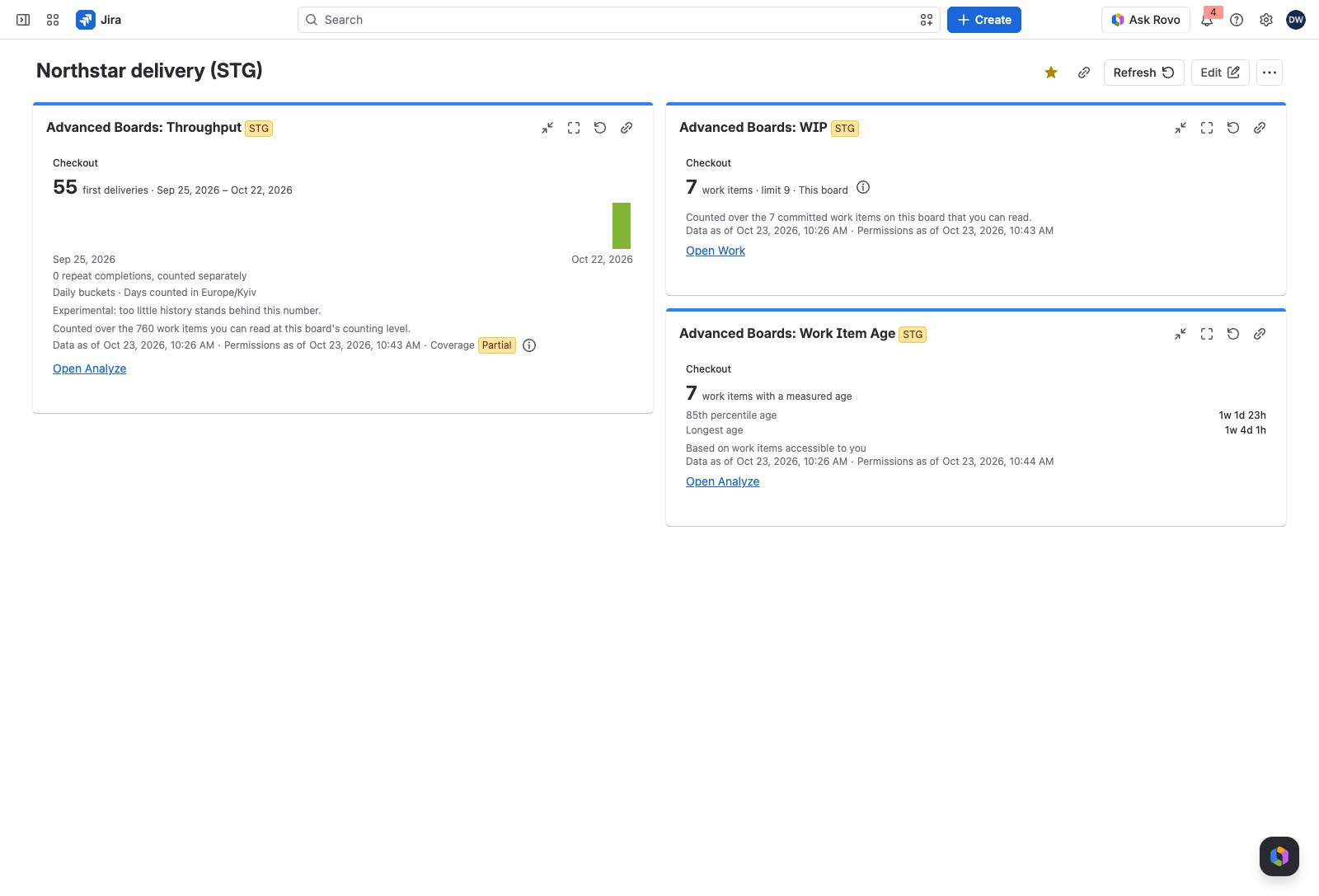
What every gadget’s tile can show #
All four gadgets share these parts:
- Beside the board’s name: Import failed, Reindex failed or Refresh failed when the last refresh failed and none has worked since, so the tile shows the last good data. Out of date means the board’s configuration changed after the figures were calculated. Indexing, Paused or Deleting is the board’s own state.
- Under the figure: up to two warning lines, then “and 3 more” with the count of the rest. One can read “This number was calculated before a correction of Oct 14, 2026 and changes once the board is recalculated.”
- In the footer: the count line, “Data as of”, “Permissions as of”, and Partial when coverage is incomplete.
- While the dashboard refreshes: “Updating: still showing the previous answer.”
- When the tile cannot answer, it shows the app’s message alone, without a figure or a link, and Try again where trying again can help. While it tries, it reads “Trying again…”. If it is refused again, it reads a line such as “Tried again at 10:58 AM. Still busy.” The messages are on Troubleshooting & FAQ.
- When the tile’s own part of the page fails, it reads “This part of the page stopped working” with Try again.
How it relates to the board #
The count follows the board’s own policies under Configure → “Policies & agreements” (Policies and WIP limits). A gadget has no export.
If something looks off #
- “No overall limit set.”: the board agrees no limit for the whole board, so set one on the board or choose another limit.
- “The WIP limit pinned to this gadget is no longer on the board, so the board’s own limit is shown.”: edit the gadget and choose another.
- “The license is inactive”: the gadget needs an active license, so ask a Jira administrator.
- “You can’t see this board”: you hold no role on the board, so ask a Board owner for access.
- “This gadget’s configuration could not be read. Choose a board again.”: edit the gadget, choose the board and save.
- “This gadget could not read its place on the dashboard. Remove it and add it again.”: remove the gadget and add it again.
The other gadgets #
- Advanced Boards: Throughput: first deliveries over a window, as bars.
- Advanced Boards: Work Item Age: how old the unfinished work is, against the agreed level.
- Advanced Boards: Forecast: the date or the count of a saved forecast run.


