A value stream names the stages work moves through, one board per stage. It shows where work waits between teams and which work items are queued for the next stage.
Create a value stream #
A manager of the portfolio creates one. A value stream has two to eight stages, and a portfolio holds up to 10 value streams.
- Open the portfolio’s Settings tab.
- Under Value streams, select Create value stream.
- Enter the Value stream name, for example Checkout to Release train.
- For each stage, choose a Board and give an optional Team label. The label is your own word.
- Select Add stage for more stages.
- Select Create value stream.
Two stages in a row can’t be one board. Use Move stage 2 up, Move stage 2 down and Remove stage 2 to reorder or drop a stage. A stream keeps at least two stages.
Edit or delete a value stream #
The Value streams card in Settings lists each stream with its Stages. With none it reads “No value stream yet. A value stream names two to eight stages in order.” A portfolio holds up to 10 streams; at the limit, Create value stream is held with “This portfolio holds the most value streams it can (10).”
Open a stream’s row menu and choose Edit value stream or Delete value stream. The edit dialog works like the create dialog.
Deleting asks “Delete Checkout to Release train?”. Its handoffs stop being shown and its stages are forgotten. The boards, their configuration and their work items stay. Select Delete value stream to confirm. This cannot be undone.
Read the Value streams tab #
Choose the stream in the Value stream picker. If the portfolio has none, the tab reads “No value stream yet” and “A value stream names two to eight stages in order and shows where work waits between them. A manager creates one.” A manager sees Open Settings instead of the last sentence, to create one.
The strip above gives Permissions as of and the coverage. Its (i) says what the coverage counts: the work in progress at the stages and the work items the Between stages rows name.
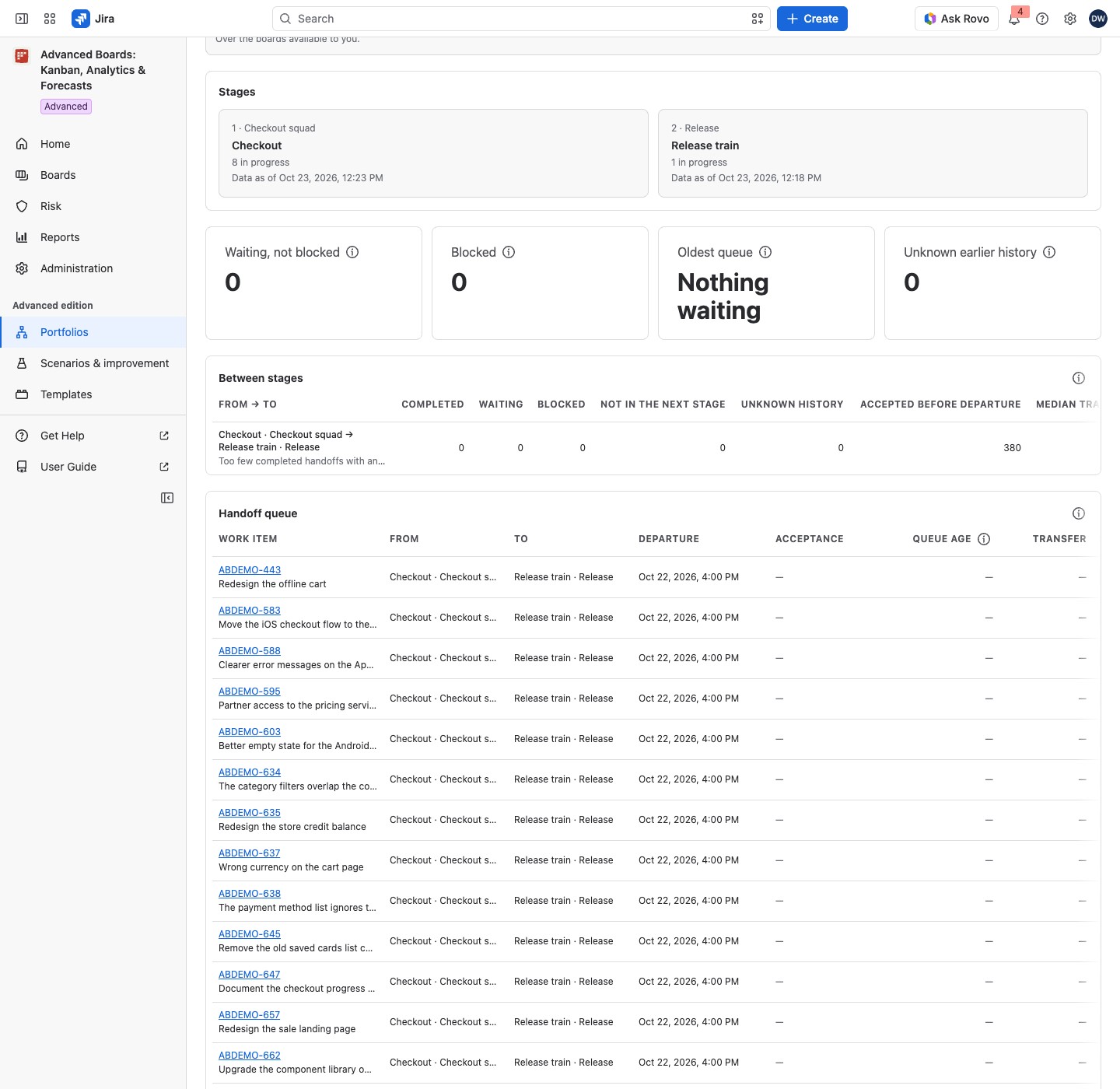
The Stages card shows each stage with its team label and how many work items are in progress. Each stage card states its own Data as of. A stage with no published flow states no number.
Four tiles sum all stage pairs you can observe:
- Waiting, not blocked: work that left one stage and isn’t accepted yet.
- Blocked: waiting work that is also marked blocked, counted apart.
- Oldest queue: the longest wait, or “Nothing waiting”. A caption names its pair, such as “Checkout → Release train”. Its (i) says each wait is measured to the receiving stage’s Data as of.
- Unknown earlier history: work items whose earlier handoff can’t be observed.
For example, in Checkout to Release train, a work item that Checkout has finished and Release train has not yet accepted counts under Waiting, not blocked. If it is also marked blocked, it counts under Blocked instead. Once Release train accepts it, it becomes a completed handoff with its transfer time.
Read Between stages #
The card Between stages has one row per pair, From → To. Its columns count each kind of handoff.
| Column | What it counts |
|---|---|
| Completed | Departure and acceptance were both observed |
| Waiting | Departed, not yet accepted |
| Blocked | Waiting and marked blocked |
| Not in the next stage | Left the earlier stage and isn’t a member of the next |
| Unknown history | History doesn’t reach back far enough |
| Accepted before departure | Acceptance came first, so it isn’t a transfer |
| Closed without starting | The next stage closed it unstarted; no wait is measured |
Median transfer and Oldest queue follow. The usual wait line reads “Usual wait (85th percentile of … handoffs): …”, at the percentile set in Administration → Risk automation. It is the figure a handoff rule compares a queue with (Risk rules). With too few handoffs it reads, for example, “Too few completed handoffs with an observed departure in the last 180 days to state a usual wait (3 of 20)”. The usual wait needs 20 timed handoffs. A completed handoff counts when it was accepted in the last 180 days, and any other handoff when it left the earlier stage in that time. Waiting, blocked and unknown-history work counts at any age. The card’s (i) says the same.
A pair on one flow definition reads “These two stages share one flow definition, so a crossing between them is not an observable handoff.”
Read the Handoff queue #
Each row is one work item with its From, To, Departure, Acceptance, Queue age, Transfer and State. State uses the words of the Between stages table; hover it for its meaning. A blocked row shows “Blocked since” and a date (or “Blocked since before” a date when the block began before the kept history), and its (i) says why the work item is blocked. Transfer is the time from departure to acceptance. Reopened work shows “Reopened” with its date. A departure before the stage’s retained history shows “Before” and a date.
Queue age runs from the departure to the receiving stage’s Data as of, not to now. A handoff is two observed events: the earlier stage finishes the work, and the next stage accepts it. A change of assignee alone is never a handoff.
A long queue shows Show more to read the next page. With no handoff, the queue reads “No work item has crossed between these stages in the observed history.”
If something looks off #
- “A deleted board was taken out of this value stream.”: a manager saves the stream to clear the notice.
- “Fewer than two stages”: a manager adds stages, because a handoff needs two.
- “This value stream’s stages hold more work in progress, waiting work and recent handoffs than one read can authorize.”: a manager shortens the stream or splits it.
- “A stage has published no flow yet, so nothing between these stages can be observed.”: wait until that stage’s board has finished its first import.
- Accepted before departure on many rows: the earlier stage’s flow still counts a status after the handoff as active, so the work item reopens there. On that board, give every status at or after the handoff the Done class (Flow, boundaries and blockers).


