An alert is a risk signal that a rule has caught and given to an owner. Each alert keeps the measure that raised it, waits to be acknowledged and can propose one action in Jira.
Read the Alerts tab #
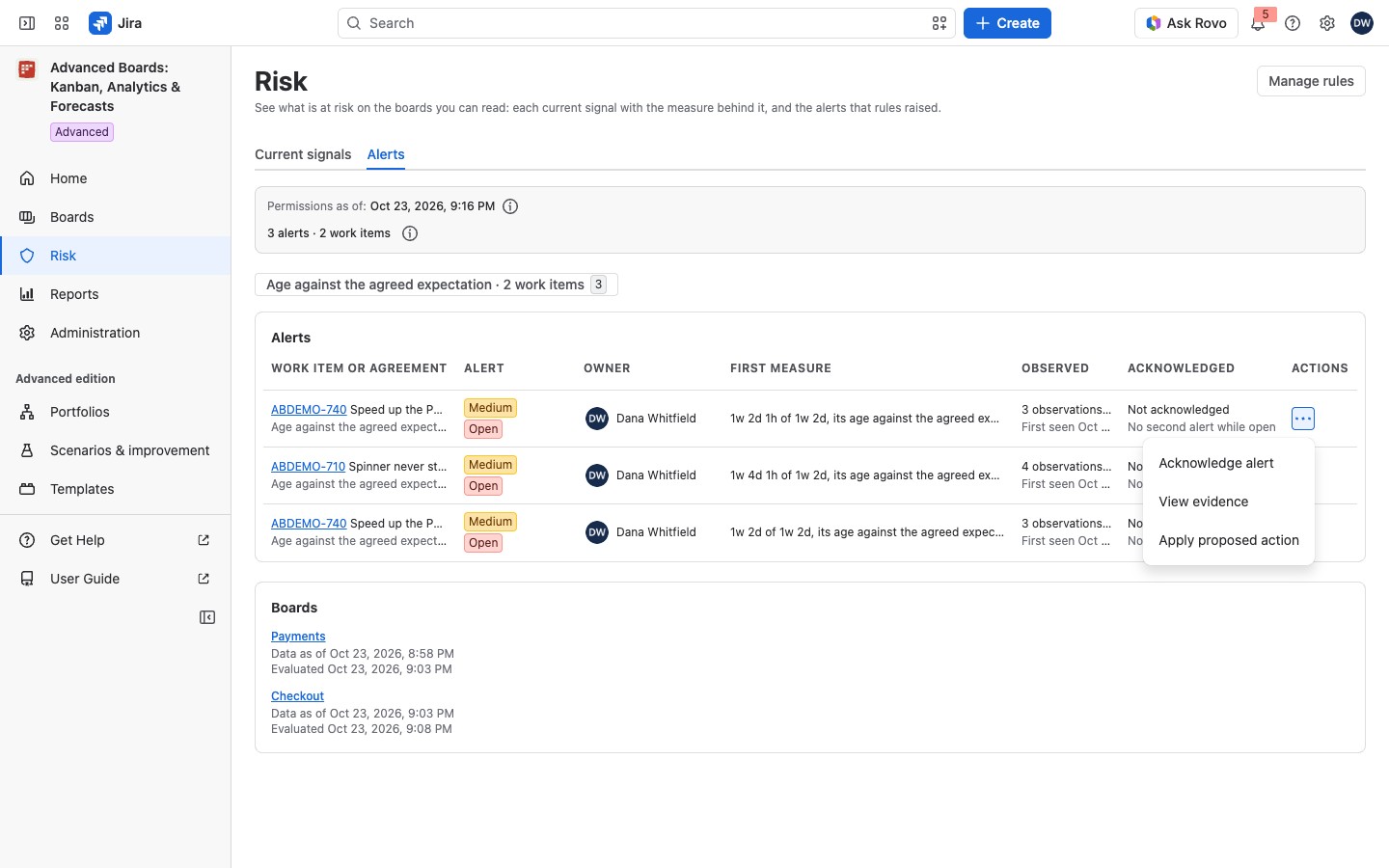
Select Risk in the navigation, then open the Alerts tab. It lists every alert you can read, most severe first. Chips above the table filter by signal family. A family with no rule has no chip. The Boards card gives each board its “Data as of” time and when its rules last ran (“Evaluated”). The (i) beside the counts says how they are counted.
The table has these columns:
- Work item or agreement: the work item or agreement, then a line with the signal family, the rule and the board that raised it, and, when the rule proposes an action, its state: “Proposed”, “Applied” or “Paused” (a paused one says why). A rule with no proposed action adds nothing here.
- Alert: its severity over its state.
- Owner: the person who answers for it.
- First measure: taken when the alert first fired, and never changed.
- Observed: how often the rule saw it.
- Acknowledged: who took it, when, and when the cooldown ends.
If the agreement was deleted, the first line reads like “<agreement> · <scope>: this agreement no longer exists; the name is the one recorded when the alert opened.” If it was edited, it reads “<agreement> · <scope>: this agreement was edited after the alert opened; the scope is the one recorded then.”
The state is Open, Acknowledged or Resolved. Open is red, Acknowledged blue, and Resolved plain text. Severity is gray for “Low”, yellow for “Medium” and red for “High”. Cannot be assessed replaces the state when the rule can’t judge the alert. The (i) beside it reads “Whether a blocking link’s other end is finished is not known, so the rule cannot tell whether this work item is still blocked.” The alert stays as it was until the rule can judge it.
Observed reads like “3 observations · 1 after acknowledgment · 0 reopens”. Under the counts, a second line says when the alert was first and last seen. An open alert the rule’s last pass did not check again reads “First seen <time>, not re-checked since <time>”. An alert nobody took reads “Not acknowledged” under Acknowledged and, while it is open, “No second alert while open”. Select Show more to read more alerts. A chip for a family with none among those loaded reads “No alert in this family among the <n> read so far. Show more to read the rest.”, where <n> is the number of alerts loaded. The counts above the table can differ from the rows: one work item can carry several alerts. Alerts are kept up to 90 days after they were last seen.
First measure can read “Not resolved on this page. Open the evidence to see it reauthorized whole.”: choose View evidence to see it. “Not shown: this alert’s evidence is no longer kept.” means its retention period passed. “Not shown: it counted a work item you can’t read now.” means the alert’s evidence names work you cannot read. “Not shown: this alert’s evidence is damaged and can’t be opened.” means the kept evidence cannot be read by anybody.
For example, a Checkout work item passes its 9-day SLE. Its row reads “Age against the agreed expectation · raised by Aging past the SLE on Checkout”, with “Medium” over “Open” and Dana Whitfield as Owner. Dana chooses Acknowledge alert and adds a note. The state turns Acknowledged, her note is kept with the alert, and for one day no second alert opens for it.
Open a rule’s page #
Select a rule’s name, in the Rules page or under the work item in the Work item or agreement column. The page shows the rule’s state, its severity, its open alerts, the Board, What it watches, Owner and Cooldown. Its header holds the same actions as the row menu. While the rule runs it also shows Last evaluated and Next evaluation. Below sit the rule’s own alerts.
- State: an enabled rule shows no lozenge. A paused rule keeps its lozenge, and its (i) says why it is paused. When the board has no agreed expectation, a Board owner sees Set it beside it.
- Open alerts: a count such as “2 open alerts”. Its (i) Which open alerts are counted reads “Based on work items accessible to you”.
- Last evaluated: “This rule has not been evaluated yet.” until its first pass.
- No alerts from this rule: the empty list. Under it, a sentence says why, such as “No alert of this rule that you can read was seen in the last 90 days.” or “This rule is paused, so nothing is being compared. Its state above says why.”
- On Standard, the page carries the purple lozenge Retained result: produced under the Advanced edition and says “The rules you have stay readable, and a Board owner can delete one. Creating, editing and accepting rules need the Advanced edition.”
Act on an alert #
The row menu holds Acknowledge alert, View evidence and Apply proposed action. What each one does, the evidence and the outcomes of an assignment are in Acknowledge and act on an alert.
On the Standard edition #
On Standard, only View evidence remains in the row menu. The tab says “Rules evaluate on the Advanced edition. On this edition they are paused and nothing new is raised; the alerts below were produced under the Advanced edition and stay readable.” With no alert, it reads “Rules evaluate on the Advanced edition. On this edition no rule is evaluated and nothing new is raised.”
If something looks off #
- “No rule is configured on any board you can read. A rule turns a signal into an alert somebody owns, with a severity, a cooldown and an acknowledgment.”: select Open Rules to create one.


