Share publishes a view of a board for the people who follow its work. A stakeholder view names what it presents. It computes its figures for each reader when they open it.
Find the views #
Select Share on the board. The card Stakeholder views lists each View with its Last changed and an Actions menu holding Edit view and Delete view. A view that presents a forecast run also says until when the run is kept, as in “Forecast run kept until …”, or “Run no longer kept”.
Create a stakeholder view #
- Select Create stakeholder view.
- Enter the Name.
- Choose one or more surfaces under What it presents, and fill in the fields each one asks for.
- Turn on Offer an export of what this view presents if readers may export it.
- Select Save, then Publish in the confirmation.
| Surface | What it shows and asks |
|---|---|
| Board overview | Status, work in progress, blocked work, recent completions and key risks |
| One analytics question | One Metric over a period (From, To), with a Duration and a Membership. It is frozen at the board’s definition version |
| A saved forecast run | One run, chosen in Forecast run, shown as it was computed |
| Risk signals | The board’s current risk signals |
| Plan timeline | The board’s timeline, read-only; you set Timeline unit, Group by and Show dependency arrows |
A view presents each surface at most once. A saved forecast run is kept for up to 30 days. Where a site rule is in force (Advanced edition), a save or a delete also asks for a Reason for the change, and a locked rule holds Save with its reason (Source and scope).
After you publish, a card shows the Link, with Copy link, Open view, Go to recipients and Close. Deleting a view removes it for everyone, and the link stops working.
Add recipients #
Publishing a view gives nobody new access. A person needs a role on the board to open it.
- Select Show recipients on the Recipients card.
- Select Add people.
- Choose a person or a Jira group, then select Add.
A recipient gets the Viewer role. This card adds and removes Viewers only. Select Open access settings for every other role. Others read “Only a board owner can see who has access to this board.” The card holds a limited number of people and groups. When it is full, Add says “This board already names … people and groups. Remove one before adding another.” A person who already has a role on the board can’t be added here.
What a reader sees #
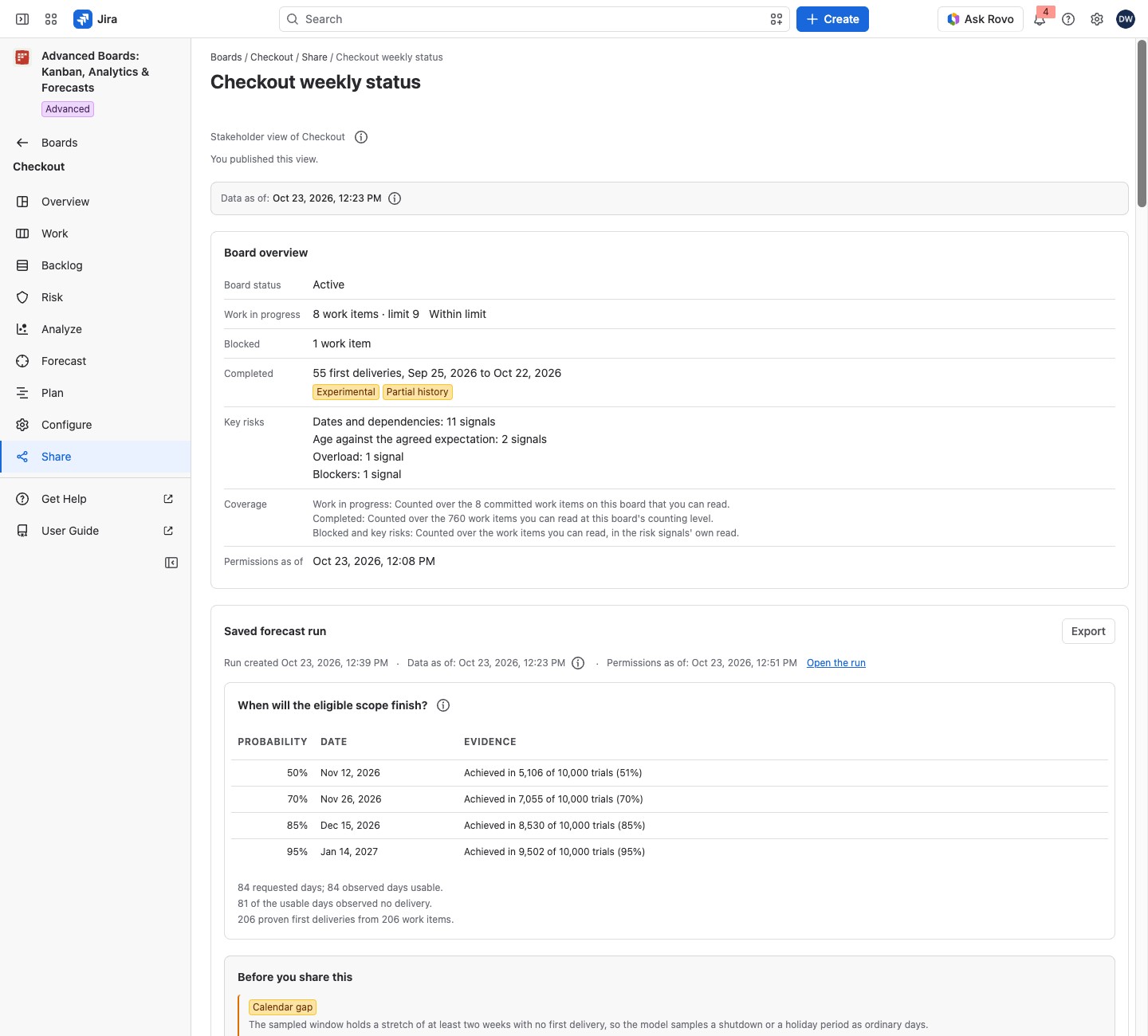
The page is headed with the view’s name, and the line under it reads “Stakeholder view of” and the board’s name. Every live figure is computed for that reader over the work items they can read. Two people can open one view and see different rows.
The overview shows Board status, Work in progress, Blocked, Completed and Key risks, with Coverage and Permissions as of rows (Data as of, permissions and coverage). A figure the view cannot give you reads “Not shown”. Key risks reads “None open that you can see” when you see none. Where a shared limit counts this board only together with other boards, Work in progress reads “This board’s work in progress is counted here only together with other boards.”
The other surfaces:
- One analytics question adds Percentiles.
- A saved forecast run shows as it was computed, with Open the run, and only to a reader who can read every work item it used.
- Risk signals and Plan timeline count only the work items you can read.
Each surface links to its board section, such as Open the board’s Risk section. An export is made over the rows you can read.
How a view follows its board #
An analytics question stays at the definition version it was frozen at. After the board publishes a new flow version, a Board owner selects Re-freeze at version in the view’s editor. A yellow Stale lozenge means the figures come from the board’s last update. Its (i), “Why this view is stale”, gives the reason.
A view that cannot be read says “This view is not showing anything”, with Back to Share. The card Exports and dashboard gadgets has Open Reports for kept files (Reports and exports).
If something looks off #
- “This forecast run is no longer kept, so its numbers are not shown.”: a Board owner selects Choose another run.
- “This question is frozen at a definition version the board no longer answers for, so asking again is refused again. A board owner can re-freeze it at the current version in this view’s editor.”: ask a Board owner to re-freeze it.
- “This board has not finished its first import, so this view has nothing to present yet.”: open the view again once the import finishes.
- “No records in this period” or “Records found, none with a value” on an analytics question: there was nothing to measure, which is not a zero. Ask a Board owner to choose a wider period in the view’s editor.
- “Not shown with your current access” on a saved forecast run: the run counted a work item you can’t read. Select Open this board’s forecast to run the question yourself.
- “You need the board owner role to publish, change or delete a stakeholder view.”: ask a Board owner.


