Work is the board itself in Advanced Boards: your Jira work items as cards, by column and lane, shown against the limits your team agreed.
Open Work #
- Open a board from Home or Boards.
- Select Work in the board’s sections, or Open board on its Overview.
The work items still waiting to be committed are also listed, in rank order, on Backlog (Backlog).
The header holds the Saved views menu, Export (every work item the view and filters select, as XLSX or CSV) and, for a Member or a Board owner, Create work item.
Read the strip, columns and lanes #
- The context strip stands under the board. It states Data as of, Permissions as of and the coverage. On Work it also counts the work items in the current filter and those read for this page. It moves above the board while the board’s last refresh failed or its data is stale (Data as of, permissions and coverage).
- The WIP strip sits above the columns. Board WIP counts work in progress against the board’s limit, as in “Board WIP 7 · limit 9”. While a quick filter is on, it adds In WIP under the filter with the WIP it matches.
- Class of service chips follow it, such as “Expedite · 1”. A limit that leaves Expedite out shows both counts. Classes and Expedite are set in Calendar, service levels and classes of service. A chip reads “not measured” while Jira did not answer the class of every work item; it never shows a zero. The (i) About this limit says what a chip counts or why it is held.
- Column heads count their work, as in “3 in WIP · limit 2”, and mark the limit with a lozenge: a yellow At limit, a red Over limit or a yellow Below the minimum. A column inside its limit carries no lozenge.
- Column groups are a dashed band over related columns. Where a policy limits the group, the band shows that limit and its state in words, such as At limit or Over limit. Select the group’s name to draw its columns as one column, and again to draw them apart. No count changes.
- Unmapped holds work items in a status no column draws. A line counts them (“3 work items are in a status no column draws.”) and the (i) About the Unmapped column says what it is. Such work keeps its commitment, its age and its place in WIP, and counts in Board WIP. The Unmatched lane counts in Board WIP too.
- Lanes are rows the Board owner set up in Columns, lanes and cards. Work no rule matches sits in Unmatched. Select a lane’s name to hide its cards.
A lane’s heading carries its count. A lane per space reads “Space” and its key. A lane for a person you can’t see reads “Someone you can’t see”. A lane of a parent you cannot read reads “A parent this board does not show you”. A lane whose name Jira did not give you reads “A lane whose name you cannot see”. Work still placed in a lane the board removed sits under “A lane this board no longer has” until the recalculation ends. While a lane is loaded in part, it says how many of its work items are loaded, such as “12 of 30 work items loaded”.
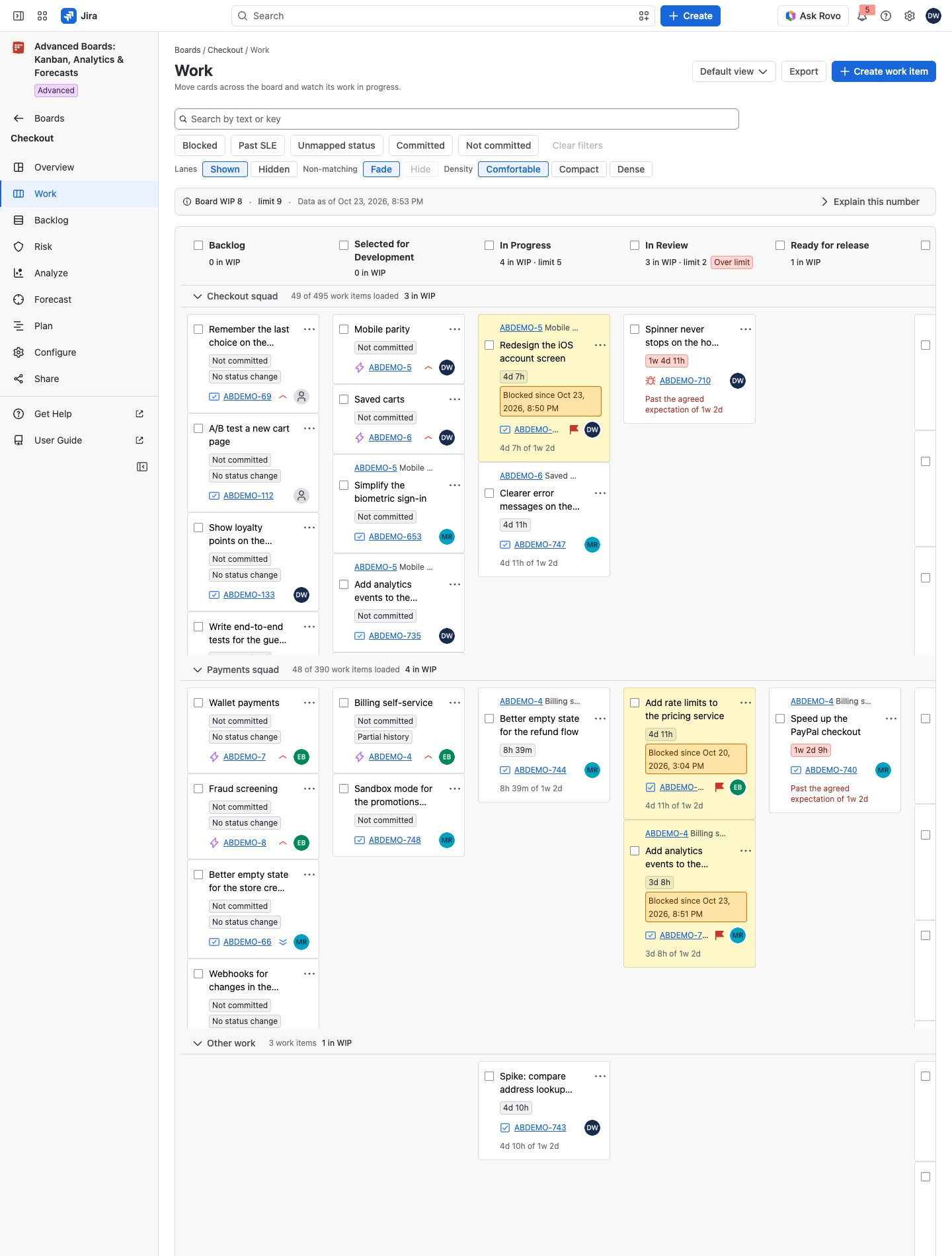
Read a card #
A committed card shows its age as a lozenge, such as “4d 2h”. The line under it compares the age with the agreed service level expectation (SLE), as in “4d 2h of 6d”. Past the SLE, the lozenge turns red and the line reads “Past the agreed expectation of 6d”. The card also shows the fields and tag colors set in Columns, lanes and cards, its Parent:, and Delivered with the date once done. Other marks:
- Not committed, Rework, not committed, Age unknown: not committed yet, reopened from Done, or committed before the history the app keeps.
- Blocked since: hover for the cause, “Flagged in Jira”, “In a blocked status (…)” or “Blocked by …”. What counts as blocked is set in Flow, boundaries and blockers.
- Moved here: Jira confirmed a move. Counts update with the next calculation.
- Not counted (its type is outside the counting level), History unknown, No status change, Partial history: how much the app knows.
- Deleted in Jira, Archived in Jira, Access lost, Not confirmed: the card is left out of the WIP numbers.
A compact or dense card has room for one icon. It shows the strongest mark true of the card: blocked first, then past its SLE, then a partial history, then the rest. Hover the icon for every mark the comfortable card prints, the type and the assignee.
To move a card, change its fields or create a work item, see Move, edit and create work items. To act on several work items at once from the selection bar, see Batch actions.
Filter, search and page through Work #
Above the columns sit the search box, the quick filters, and the Non-matching, Lanes and Density switches. The Saved views menu chooses a view. Filter, search and views on Work explains each of them.
The footer under the board counts what is loaded, such as “40 of 120 work items loaded, all the unfinished work among them.” Its (i) How these cards are ordered names the order. A column or lane cell that holds more ends on Show more, a control named for its column (and its lane, where lanes are drawn). The Done column ends on See older work items. Each control reads only that place and changes no count.
Open the numbers behind a limit #
Select Explain this number to open WIP policies: each limit with its state, how it counts, the work items behind it and the agreement your team made. WIP policies and the numbers behind a limit explains the panel.
Work draws a limit only on a part it shows exactly. Otherwise a notice says why and offers Open Policies & agreements.
If something looks off #
- “This board holds no work items yet”: nothing has been imported into the board, or its source matches no work item you can see. Check the source in Configure (Source and scope).
- “Lane rule 2 could not be read …”: select Open Layout & cards and edit the rule.
- “Color rule … could not be read by Jira, so it and every rule after it color nothing.”: a Board owner corrects it in Layout & cards (Card fields and color rules).
- “This board’s swimlanes were changed and it is being recalculated …”: wait. The new lanes appear when the recalculation finishes.
- “A work item you cannot see” on a card: Jira did not return it to you for this page, so nothing about it is shown.
- “A work item whose name could not be read just now”: Jira did not answer this page’s read. Open Work again.
- “This explanation is out of date”: select Read the measure again.
- “This board has not finished its first import”: wait for the import, shown on the board’s Overview.
- “This installation has no active license, so the board is not shown.”: you can still export its work items, read kept results and delete your data (Standard and Advanced editions).


