Risk shows what is at risk right now on the boards you can read. Each signal names the work item or scope, its measure and where to fix the cause.
Open Risk across boards or on one board #
- Risk in the navigation: the cross-board queue. Its Current signals tab lists the signals of up to 25 boards you can read.
- A board’s Risk section: the same signals for that board alone, under the board’s own name in the navigation.
On the cross-board queue, a Boards card names each board it measured, with its own Data as of time. A long list ends on Show more. Under each board, a line says what its ages were compared with:
- “One agreed expectation of … applies to every work item on this board.”: one service level expectation (SLE) for all its work.
- “This board maps classes of service, so every age was compared against the expectation its own class agreed.”: each signal carries its own class’s figure.
- “SLE not set; comparison not performed.”: the board has no SLE, so no age is compared.
- “This board agreed several expectations per class of service and maps no class …”: no age is compared. A Board owner maps the classes in Calendar, service levels and classes of service.
A further line says when a date check did not run on that board, such as “Planned dates were not read for this board in this request.”, or “No unfinished work item on this board, started or not, carries a planned date, so no date was compared.”
What raises a signal #
A signal appears only where something was agreed or recorded. Each family reads a different setting of the board.
- Age against the agreed expectation: “Past the agreed expectation”, “Approaching the agreed expectation” and “Age unknown”. The SLE is set in Calendar, service levels and classes of service.
- “Approaching the agreed expectation”: the age is at least 80% of the SLE and not longer than it. An age exactly at the SLE still approaches it.
- “Past the agreed expectation”: the age is longer than the SLE.
- “Age unknown”: the work item was committed before the history the app keeps, so its age cannot be stated. It is never a breach.
- Overload: “Over the agreed limit”. The WIP limits come from Policies and WIP limits.
- Blockers: “Blocked”. The Blockers settings are in Flow, boundaries and blockers.
- Dates and dependencies: “Past its planned finish”, “Planned dates missing”, “Starts before the work blocking it finishes” and “Blocking chain closes on itself”. They come from Plan.
Read a signal and act on it #
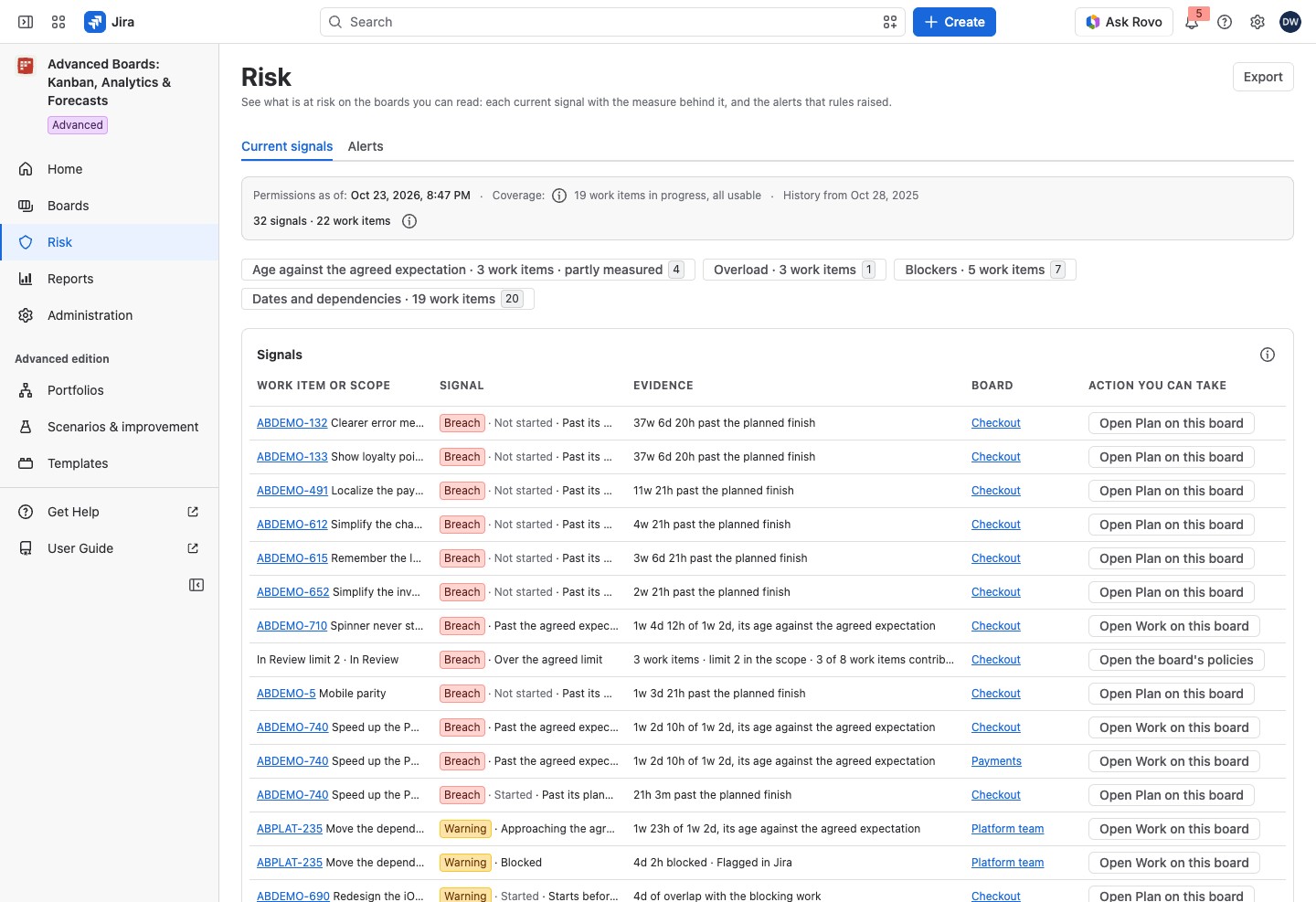
The table lists signals most severe first, and oldest first within a severity. Its columns are Work item or scope, Signal, Evidence, Board and Action you can take.
- Severity: the lozenge in Signal. A red Breach means something agreed was broken, such as an SLE or a WIP limit. A yellow Warning is a measured condition that has broken nothing yet. A gray Note is a data-quality state, such as “Age unknown”. Alerts from rules use Low, Medium and High instead.
- Date signals: the cell also says “Started” or “Not started”, because this family covers every unfinished work item.
- Family chips: select a chip to show one family. “Not measured” or “partly measured” on a chip means a check did not run everywhere.
- The two counts: signals and work items are counted apart, such as “5 signals · 4 work items”. One work item can carry several signals, and an overloaded scope is one signal, so the numbers need not match. The (i) How the two counts are counted says so. On the cross-board queue the counts close the strip. On a board’s own Risk they stand beside the Signals table’s title, and the strip above holds Data as of, Permissions as of and the coverage, whose (i) names the board’s flow and calendar versions.
- Evidence: the figure first, then what it measures, so a clipped cell keeps the figure. Examples are “…, its age against the agreed expectation”, “… in the scope”, “… blocked”, “… contributing”, “… past the planned finish”, “… of overlap with the blocking work” and “… work items in the chain”. A Blocked row adds its cause, and a blocking work item’s key there links to it. “at least” before a time means the block began before the history the app keeps, so only a lower bound is known. A signal with no duration reads “No duration could be measured, which is the fact this signal states.”
- Links: a work item’s key in Work item or scope opens it in Jira, and the name in Board opens the board.
- Action you can take: a button that opens the place to act, such as Open Work on this board, Open the board’s policies, Open Flow & time, Inspect the history on Work or Open Plan on this board.
Counts cover only the work items you can see in Jira. Data as of, permissions and coverage explains the strip.
Alerts come from risk rules #
The cross-board queue has a second tab, Alerts. A rule turns a signal into an alert that somebody owns, with a severity, a cooldown and an acknowledgment. Select Manage rules in the header of that tab to reach the rules.
The Alerts table has the columns Work item or agreement, Alert, Owner, First measure, Observed, Acknowledged and Actions. Risk alerts explains each column and the rule page, and Acknowledge and act on an alert explains acknowledging and acting.
A banner can say why no new alert appears:
- “Rules evaluate on the Advanced edition. On this edition they are paused and nothing new is raised; the alerts below were produced under the Advanced edition and stay readable.”: the site runs Standard.
- “This installation has no active license, so no rule is evaluated and nothing new is raised.”: the license is inactive. Alerts already raised stay readable.
- “Waiting for Atlassian to confirm this site’s license. No rule is evaluated meanwhile.”: rules wait for the license answer.
The banners that start “No rule is configured” and “A rule you can act on is paused” offer Open Rules (see below).
Export the current signals #
Select Export on either list and choose Spreadsheet (XLSX) or CSV (zip with data and metadata). The file holds every signal the list selects, up to 2,000 rows. Its times are in UTC, because the boards can use different time zones. While a family chip is pressed, it holds that family alone.
If something looks off #
- “SLE not set; comparison not performed.”: a Board owner selects Set it beside it to agree one.
- “You can read more boards than one request evaluates.”: the queue measures 25 boards, which the Boards card names. Open a board’s own Risk section for any other.
- “No current signals”: nothing checked is past an expectation, over a limit, blocked or in conflict.
- “No board measured yet”: create a board, or wait for a new board’s first import to finish.
- “Planned dates were not read for this board in this request.”: open that board’s own Risk section, which measures it alone while it holds at most 1,000 unfinished work items.
- “Summaries were read for the first … work items on this page. The rest are shown without a name.”: every signal is still listed; only some names were not read. Select a family chip to list fewer signals on the page.
- “No rule is configured on any board you can read.”: a Board owner creates a rule, as Risk rules shows.
- “Nothing has been imported into this board yet.”: wait for the board’s first import.
- “This board could not be evaluated for this request, so it contributed no signals.”: open the board’s own Risk section, or open Risk again later.
- “A date field this board plans with cannot be found in Jira …”: a Board owner names another field in the board’s plan settings (Hierarchy, priorities and planning settings).
- “A rule you can act on is paused for a reason somebody has to clear.”: select Open Rules; each paused rule says what clears it.


