A forecast result tells you how likely each answer is and what the run assumed. Read the warnings and the method before you share a date with anyone.
Open a run #
The run you start shows on the Run a forecast tab during that visit. Every run is also saved. Under Saved runs, select a run’s Created time to open its own page. The page is titled by the run’s question. A lozenge beside the title gives the run’s state while it is Drawing, Failed or Expired; a ready run carries none. A line under the title gives the facts: Created with its time, then “Run by you” or “Run by another person”. Run a forecast explains the review.
The strip under the title opens with Cohort, what the run covered, such as “Work items on the board the run could read” or “Selected work items, validated against the board”. Then come Data as of, Permissions as of and the coverage (Data as of, permissions and coverage). The coverage’s (i) also names the flow and calendar versions the run was computed with. The coverage reads “Partial” when some work items the run covered are not in it. Its (i) then says “Some work items this run covered are not in it, such as one whose history cannot prove whether it was delivered before. The eligibility review names each one and its reason.” It also reads “Partial” when the board held work items that Jira no longer confirmed as the run was made. The (i) then adds “When this run was made, the board held work items that Jira no longer confirmed, and the run may count them. The app could not confirm them at the last refresh before the run, or had lost access to them.”
Read the answer #
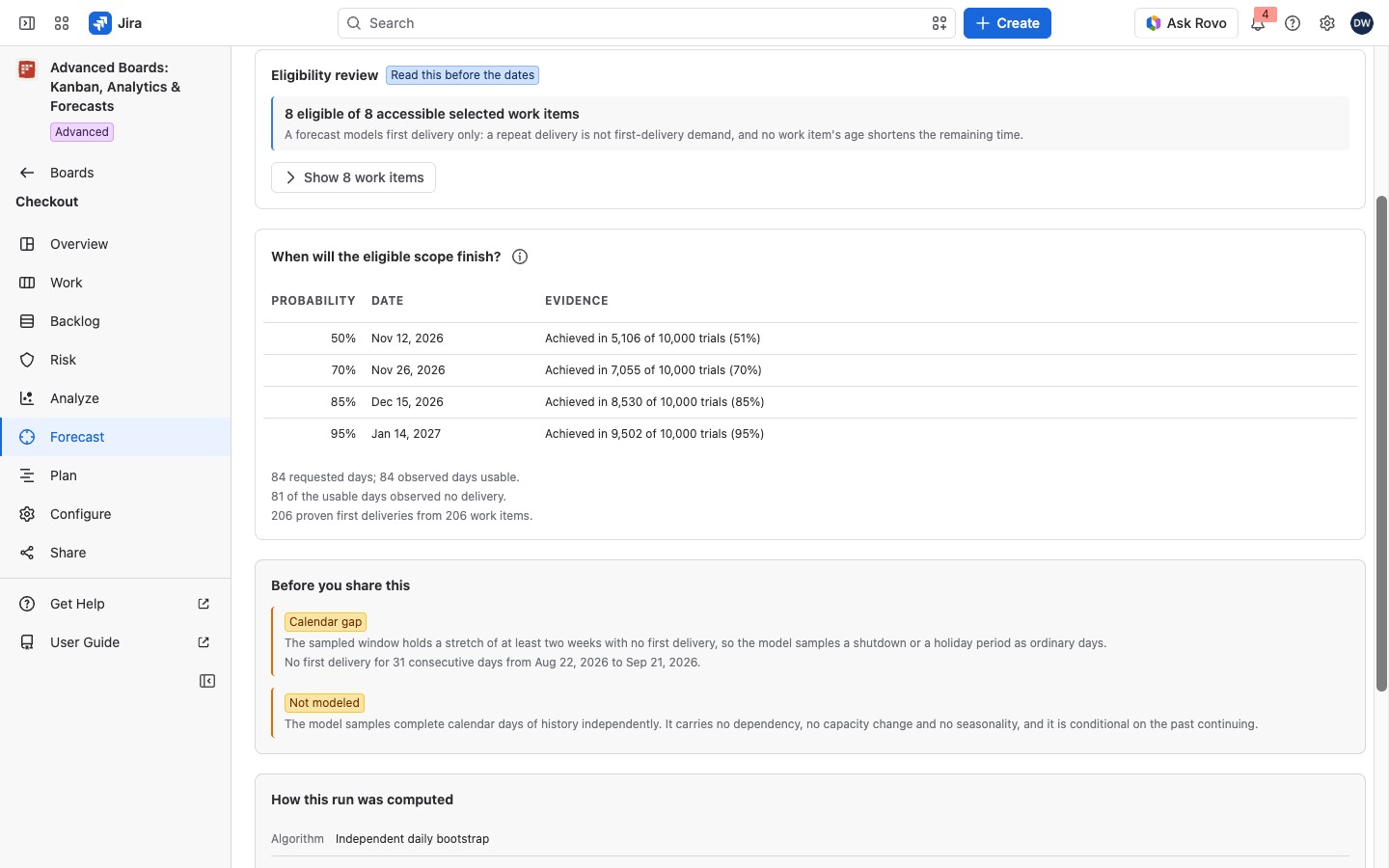
A “When” run is headed “When will the eligible scope finish?”. Each level (50%, 70%, 85% and 95%) shows a date and how many trials reached it, or “Beyond the horizon”. The table has one row per level, with the columns Probability, Date and Evidence, such as “Achieved in 8,600 of 10,000 trials (86%)”. The 85% date means 85 of every 100 trials finished by it. With nothing left in scope, a “When” run answers its start date: “The remaining scope is zero, so the run answers the start instant itself: …”
A “How much” run gives rows with the columns Probability, Answer and Evidence, such as “At least 12 first deliveries by 30 November, in at least 85% of simulated outcomes”. Read the lower bound, not the middle of the distribution.
The (i) beside each answer says what it covers:
- A “When” date: it is for the whole remaining scope of the forecast.
- A “How much” count: it counts the first deliveries at the board’s counting level that the board would reach by the date, at the rate of its history window. It is not limited to the run’s scope, so it can be larger than the scope.
- The order of work: the forecast does not say which work items finish first.
A label beside the answer rates the input. A yellow Experimental means fewer than 30 observed days or fewer than 20 deliveries. A red Insufficient data means the usable history holds nothing to sample, so the run gives no date. The label is about the input, not accuracy, and it travels into every export.
Lines under the answer describe the history:
- the requested and usable days;
- the days outside kept history, which are not zero throughput;
- the usable days with no delivery;
- the proven first deliveries sampled.
A line beside the label says why it was given, such as “observed days (below 30 days)”. On a “When” run, trials that had not finished by the horizon still count in each percent.
See the whole distribution #
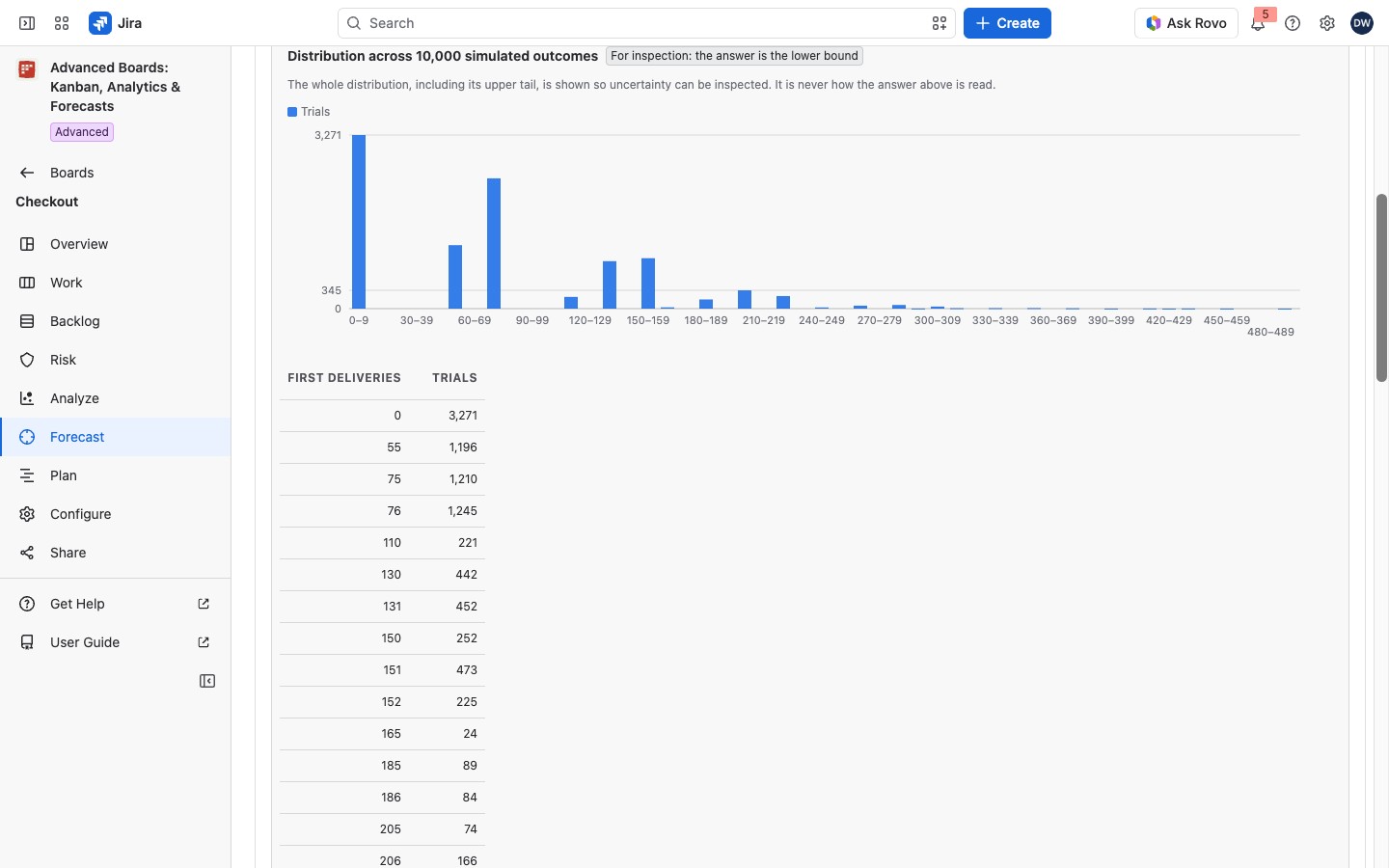
A “How much” run adds a card marked “For inspection: the answer is the lower bound”. A chart and a table (columns First deliveries and Trials) show how many trials reached each number of first deliveries, with the “85th percentile of the simulated outcomes”. That percentile is never the answer.
Before you share this #
This card lists a yellow lozenge for each limit of the data or the model, with its meaning under it.
- Experimental: the input is below the agreed threshold, and the label travels into every export.
- Insufficient data: the usable history holds nothing to sample, so no date is produced.
- Partial history: part of the window is outside kept history and was not sampled.
- User-supplied scope: you typed the scope, so the run did not measure it.
- Batched delivery: deliveries cluster on one weekday. The line under it counts them, in the form “… of … deliveries fall on one weekday of the sampled window”.
- Throughput drift: the last four weeks ran at a very different rate. The line under it compares the counts of the recent days and the days before them, ending “at least twice the rate” or “at most half the rate”.
- Calendar gap: a stretch of two weeks or more had no first delivery. The line under it gives the stretch’s days and its first and last date.
- Not modeled: what the model leaves out. It replays past days, or whole weeks where deliveries batch. It knows nothing of dependencies, changes in the team’s capacity or seasons, and assumes the past continues. Say so when you share a date.
- Configuration changed since this was calculated, Data refresh failed, Calculated before a correction: the board changed, its latest refresh had failed, or the calculation was fixed since. Run the forecast again after the board’s next data update, or, for a correction, after the board is recalculated.
- Source leaves out completed work: the numbers rest on reopened work only.
- Not confirmed / Access lost: when the run was made, the board held work items that Jira no longer confirmed, and the run may count them.
How this run was computed #
The card lists Algorithm, Trials, Start, Horizon and Kept until:
- Trials: how many possible futures the run drew from the board’s past days. Every percent on the page counts these trials.
- Start: the date and time the run counts from, with the time zone the board counts days in.
- Horizon: how many days ahead each trial looks, at most 730. A “When” trial that has not finished by then counts as “Beyond the horizon”. A run without a horizon has no such row.
- Kept until: when the run is removed by itself (below).
The algorithm is one of two:
- Independent daily bootstrap: each trial draws single past days, each on its own.
- Block bootstrap: each trial draws whole past weeks where deliveries batch, and single days where they do not. A forecast schedule uses it, on the Advanced edition (Forecast schedules). So does a run that asks such a scheduled run’s question again (Run it again or Calculate with your access). On Standard no new run uses it, and a run made under Advanced still opens and names it.
A run whose history is no longer kept reads “The history behind this run is no longer kept, so these numbers are a saved summary and cannot be drawn again.”
Saved runs, states and keep time #
Saved runs lists the board’s runs, newest first, with Created, Question, Run by, State and Trials. A board with none reads “No saved run yet”. A run’s State is one of four:
- Drawing (blue): the trials are still running. The page reads “Drawing the trials” and “The run is on the queue.”, and it offers no Export until the run is ready. If your own run is paused, the page shows the job with Resume the job instead. Another person’s paused run reads “The run is paused.”, and only the person who started it can resume it.
- Ready (plain text, no lozenge): the answer is final.
- Failed (red): the run did not finish. The page says why and offers to ask the same question again, or Set up a new run where it can’t be asked again.
- Expired (gray): it passed its keep time.
A run is kept for up to 30 days. After that its numbers are not shown, and within a day the run is deleted. To ask the same question again, select Run forecast on the board’s Forecast section.
On a run’s page, or on the Run a forecast tab for a ready run, Export writes Spreadsheet (XLSX) or CSV (zip with data and metadata). The file holds the eligibility review, the input series and the result, up to 2,000 rows.
If something looks off #
- “This run produced no date: the usable history holds no delivery to sample from.”: choose a longer history window.
- “This run has passed its retention period, so its forecast numbers are no longer shown.”: select Run forecast on the board’s Forecast section.
- “This saved result is no longer available”: the run passed its 30 days and was removed. Select Run it again, or Set up a new run where its question can’t be asked again.
- “Not shown with your current access”, with “This saved result counted a work item you can’t read now, so none of it is shown.”: select Calculate with your access. It runs the same question again over the work items you can read now, as a new run.


