Flow & time says what each Jira status means to a board. Cycles, blocked work and delivery follow these choices, and so does every figure the board shows: cycle time, throughput, flow efficiency and forecasts.
Open Flow & time #
- Open the board and select Configure.
- Choose Flow & time.
The group runs from top to bottom, ending with publishing. Its calendar and service levels are in Calendar, service levels and classes of service.
Say what each status means #
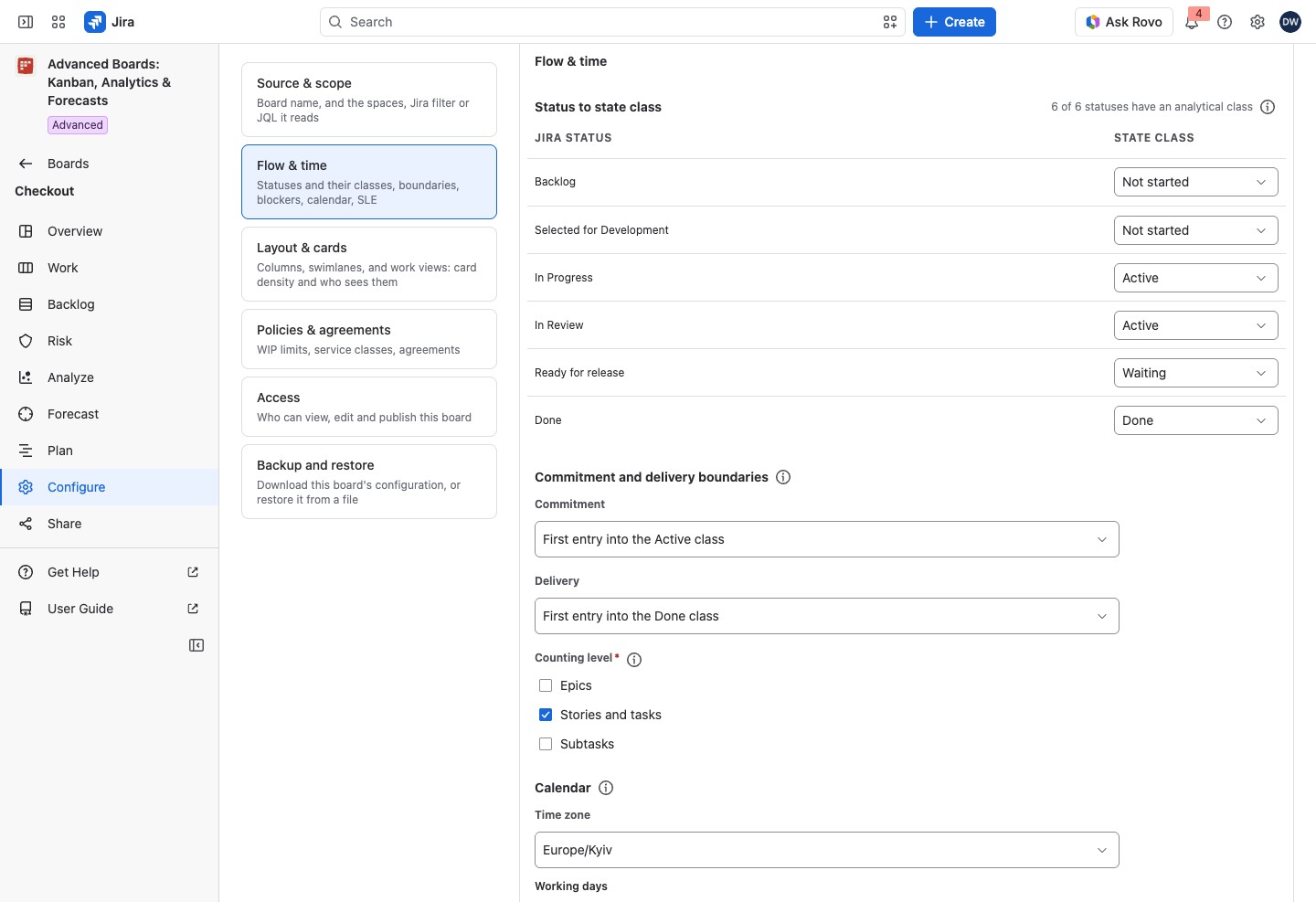
Status to state class gives each Jira status one class: Not started, Active, Waiting or Done.
- Active is time when the work is being done.
- Waiting is time in a queue after commitment. It counts in cycle time but not as active time, so it lowers flow efficiency.
- Not started is work nobody has committed to yet. A Not started status entered after commitment counts as Waiting.
- Done is finished work.
For example, “To Do” is Not started, “In Progress” and “In Review” are Active, “Waiting for customer” is Waiting, and “Done” is Done. Choose Waiting for a status where nobody works on the work item. The column a status is drawn in never changes a count.
The table’s caption counts how many statuses have a class. Under a status, a short line can explain it. “Jira reported no category for this status” means the default could not class it from Jira. “Jira no longer lists this status; its id is shown instead of a name” means the status was removed in Jira.
A new board starts with each status classed from its Jira category, where Jira gives one; no status starts as Waiting. The group shows this under the tile “Applied default: confirm it or change it”. Change the table if you need to, then select Confirm as flow version and its number.
A status your work items entered after the flow was made is listed under “Statuses your work items have entered that this flow does not place yet”. It starts and ends no cycle until a published version gives it a class.
Choose where a cycle starts and ends #
A cycle runs from Commitment to Delivery. For each, choose a rule:
- First entry into the Active class, or into the Not started, Waiting or Done class. By default, a cycle starts at the first entry into Active and ends at the first entry into Done.
- First entry into chosen statuses: pick them under Commitment statuses or Delivery statuses. Choose at least one.
Counting level says which work item types count as one item: Epics, Stories and tasks, Subtasks. Choose at least one. A parent and a child are different items. For example, with only Stories and tasks ticked, an epic and its subtasks are not counted in WIP or throughput.
Mark blocked work and leave resolutions out #
Blockers decides when a work item counts as blocked, and Excluded resolutions lists the Jira resolutions that do not count as delivered. Both sit in Flow & time and are published with the next flow version. They are explained in Blockers and excluded resolutions.
Publish a flow version #
- Make your changes. Under Publish and recalculate, What publishing would change appears and follows each edit: how many statuses change class, changes such as “Commitment: First entry into the Active class → First entry into In Progress”, and any limit counted across boards that stops being measured (Policies and WIP limits). “This edit changes nothing about what the board counts.” means the figures stay the same.
- Select Publish flow version and its number.
- Read Boards on this flow definition in the dialog. Boards that share a flow definition share its versions: publishing changes the figures of every board named there, such as “This board, and Payments.”, for everyone who reads them.
- On the Advanced edition, where the board’s level asks for one, the dialog also asks for a Reason for the change (Governance and reasons for a change). Enter it.
- Select Publish version and its number.
A new version recalculates the whole history of every board on the definition. Everyone sees the new numbers once the recalculation finishes. A saved forecast run keeps the flow version it was computed under.
After you publish, Publish and recalculate shows What flow version 2 changed: how many statuses changed their state class and one row per change, or “No status changed its state class.” Below it, the Recalculation line follows the job. It ends with “Verified outcome. The board is back to a consistent state.”, or says that the recalculation failed, was canceled or was replaced by a newer one. If a recalculation was already running, it takes the change into account.
If something looks off #
- “You can read this configuration but not change it. A board owner can.”: ask a Board owner to make the change.
- “No status is in the Waiting class. Place a status there, or choose another rule.”: a boundary names a class no status has; place a status in it, or choose another rule.
- “Choose at least one work item type to count.”: tick at least one Counting level.
- “Every status needs a state class before a version can be published.”: give each status a class, then publish.
- “Place at least one status in the Active class before a version can be published.”: give one status that class. Done has the same rule.
- “The recalculation failed, so the board still shows what it showed before.”: select Open the job to read why.
- “Jira did not answer the status lookup, so statuses are listed by id. The classification below is the board’s own and is unaffected.”: nothing is wrong with the flow; reload the page later to see the names.


