Risk rules turn the risk signals on your boards into alerts that a named person owns. A rule says what to watch, how severe a match is and who answers for it.
Open the Rules page #
Select Risk, open the Alerts tab, then select Manage rules. The page lists every rule on a board you can read, one row per board.
Each row shows the rule’s Rule, Board, What it watches, Severity, Cooldown, Owner, State and Open alerts. A rule’s name opens its page; the board’s name opens the board. What it watches reads the family and the signals, such as “Age against the agreed expectation · Past the agreed expectation”. Open alerts counts only alerts about work items you can read, as its (i) Which open alerts are counted says. A long list reads “Showing N rules”; select Show more for the next page. With no rule, the page reads No rules yet.
A warning named Rules that need somebody lists each rule paused for a reason a person can clear: an owner who has not accepted the rule as it stands, an owner who withdrew consent or lost their role, a removed agreement or value stream, a missing SLE or date field, or more handoff work than one evaluation can check. The reasons and what to do are in Manage a risk rule. On Standard this warning is not shown.
Create or edit a rule #
You need the Board owner role on every board the rule names.
- Select Create rule. To change a rule, choose Edit rule in its row menu.
- Enter a Rule name, up to 200 characters.
- Choose the Boards, what it watches and its signals.
- Select Preview matching alerts.
- Select Save rule (Save changes for an edit).
A new rule opens with What it watches set to “Age against the agreed expectation” and its first signal, “Past the agreed expectation”, chosen. Severity is “Medium”, Cooldown 1 day, Proposed action “None”, and Evaluate this rule is on.
| Field | What it sets |
|---|---|
| Boards | Up to 25; a saved rule keeps its board |
| What it watches | “Age against the agreed expectation” (the default), “Overload”, “Blockers”, “Dates and dependencies” or “Handoffs” (between the stages of a value stream: Value streams) |
| Signals it reacts to | At least one; the family’s first signal by default |
| Only at or above a threshold | Adds a Threshold: a plain number, in days, or in measure units for Overload |
| Agreements it counts | Overload, on one board: the WIP policies it counts, chosen ones or all |
| Value stream | Handoffs, on one board: the stream that hands work over (Value streams) |
| Severity | “Low”, “Medium” or “High”; “Medium” by default. It ranks alerts only and changes no measurement. A change also applies to the rule’s open and acknowledged alerts; resolved alerts keep the severity they had |
| Cooldown | 12 hours, 1 day, 2 days or 3 days; 1 day by default. After an acknowledgment the alert resets once the cooldown has passed, and a repeat sighting before then raises no second alert |
| Owner | You, or a person with a role on the board by name |
| Proposed action | “None” (the default), “Propose moving the work item to a column” (with a Target column) or “Propose an accountable person” (with an Accountable person, proposed as the assignee); a person applies it, nothing runs on its own. A proposed move needs exactly one board, because its column belongs to that board’s layout. A proposal applies only to an alert about one work item, never to an agreement alert |
| Evaluate this rule | On by default; clear it to pause the rule, keeping its alerts readable |
Each family offers its own signals. Only at or above a threshold shows only while the chosen signals share one measure, and the Threshold takes that measure’s name:
| What it watches | Signals | Threshold |
|---|---|---|
| Age against the agreed expectation | “Past the agreed expectation”, “Approaching the agreed expectation”, “Age unknown” | “Age against the agreed expectation”, in days |
| Overload | “Over the agreed limit” | “Measure against the agreed maximum”, in measure units |
| Blockers | “Blocked” | “Blocked for”, in days |
| Dates and dependencies | “Past its planned finish”, “Past cycles like it finished after its planned finish”, “Started while the work blocking it is unfinished”, “Past cycles like the blocking work finished after this one is planned to start”, “Blocking chain closes on itself”, “Planned dates missing” | “Past the planned finish by”, “Later than planned by” or “Waiting on the blocker for”, in days; none for the last two |
| Handoffs | “Waiting to be accepted longer than usual”, “Blocked while waiting to be accepted”, “Accepted with its earlier stage’s history unknown” | “Waiting to be accepted for”, in days; none for the last |
A board holds up to 10 rules and 3 owners. Date and handoff rules run hourly, the others every 15 to 20 minutes.
The editor’s (i) About alerts says: “Alerts are in-app. No Jira action runs on its own.”
Preview matching alerts needs one board. It counts the work items that match now, over the work you can read, and lists the first 50. The owner’s count may differ. If the rule would pause, it says This rule would pause right now and why.
The Preview block opens with a count, such as “3 work items match right now”, or “Nothing matches this condition right now.” Then it lists each matching work item with its measure. A date rule adds the finish it compared, such as “85th-percentile finish of comparable past cycles”, and a handoff rule the usual wait. Past 50 matches, it reads “The first 50 matches are listed. The count above is the whole match.”
A “Not judged” line counts the work items whose finish could not be stated from comparable past work, so a small count is not read as “nothing late”. The block ends on the “Data as of” instant and, for an age rule, how ages are compared, such as “Ages are compared against the expectation this board agreed.”
Select Preview again after you change a field.
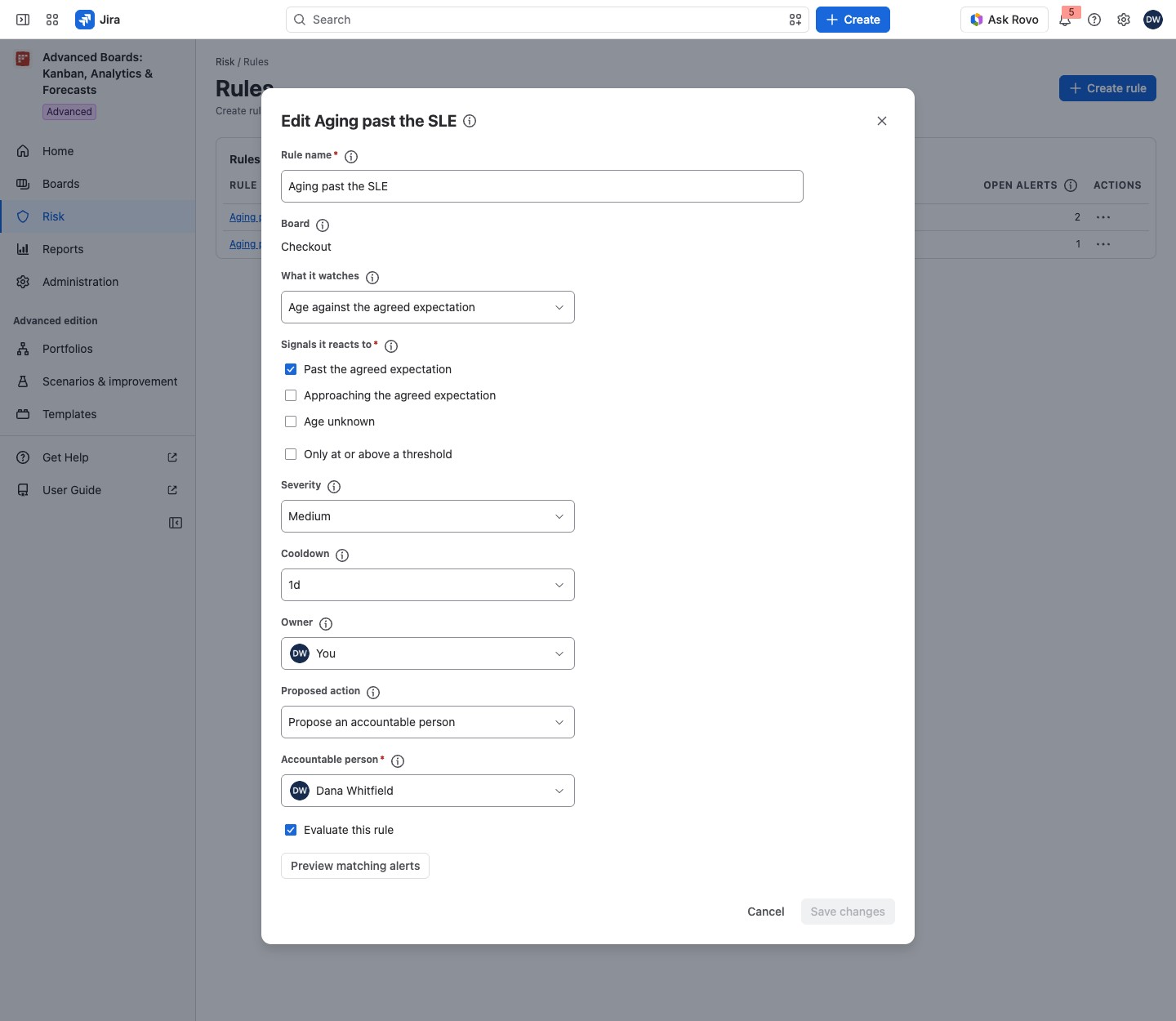
For example, Dana Whitfield creates Aging past the SLE on Checkout and Payments. It watches “Age against the agreed expectation” and reacts to “Past the agreed expectation”, at “Medium” with a 1-day cooldown. Owner is You. The proposed action is “Propose an accountable person”, with Dana as the Accountable person. The list then shows two rows, one per board. When a Checkout work item passes its 9-day SLE, the rule raises one alert that Dana owns. She finds it on the Alerts tab (Risk alerts).
Manage a rule #
Each rule has a state, a row menu and an owner who answers for it. Rule states, pausing, ownership and deleting a rule are explained in Manage a risk rule.
If something looks off #
- “A rule is made on a board you own, and you own none yet: create a board, or ask a board’s owner for the Board owner role.”: create a board, or ask a Board owner for the role.
- “Open alerts were not counted for some rules here.”: the figure was not counted, not zero; open the rule’s page to see its alerts.
- “You hold no role on this board granted to you by name, …” or “… holds no role on this board granted to them by name, …”: a Board owner gives that person a role by name in Access, or you name another owner.
- “The rules of one board can name at most 3 different owners. Choose an owner its other rules name.”: choose an owner the board’s other rules already name.
- “A proposed move needs exactly one board: its column belongs to that board’s layout.” or “A handoff rule needs exactly one board: its value stream is chosen for that board.”: keep one board in Boards.
- “No value stream has a stage before this board: …”: place this board after another stage in a portfolio’s value stream (Value streams).
- “Use a plain number, for example 9 or 9.5.”: type the threshold as a number without units.


