Scenarios & improvement lets you try a plan before you commit to it. You record a portfolio’s baseline, clone it, change the clone’s assumptions and compare the dates. Nothing in Jira changes until you apply a plan.
Create a baseline and a scenario #
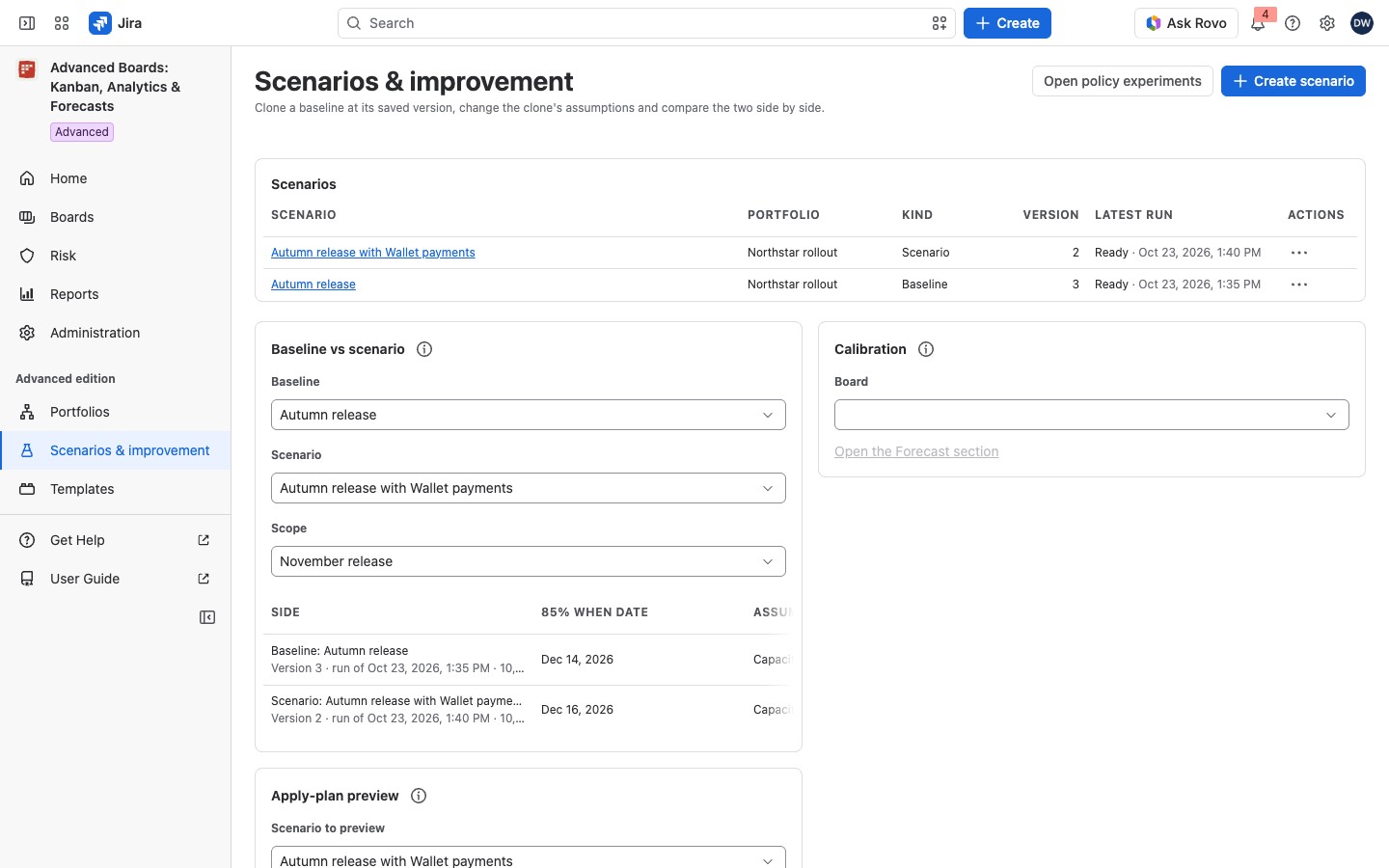
Open Scenarios & improvement in the app’s navigation. The Scenarios list shows each scenario with its Portfolio, Kind, Version and Latest run. Kind says “Baseline” or “Scenario”. Latest run gives the state and time of the last run, or “Never run”.
- Select Create scenario.
- Enter the Scenario name and choose the Portfolio.
- Under What to create, choose “A baseline of this portfolio”, then select Create scenario.
A baseline records the portfolio’s starting point. To try a change, create a second scenario and choose “A clone of a baseline”. Then choose the Baseline to clone. A clone copies the parts of the baseline you can open, so you can change them. For example, Northstar rollout holds the baseline Autumn release and a clone that adds the Wallet payments epic.
Create scenario is held if you own no portfolio. On an empty page, select Open Portfolios to make one.
Open, clone, export or delete a scenario #
A scenario’s name opens its page, where you record assumptions and run it (Build a scenario). The row menu offers:
- Clone scenario: on a baseline, for the portfolio’s owner, opens Create scenario with the clone already chosen.
- Export latest run (XLSX) and Export latest run (CSV): save the latest ready run. An export never starts a new run.
- Delete scenario: for the portfolio’s owner (Portfolios); it is also at the bottom of the scenario’s page.
“Delete Autumn release?” says its runs and their numbers stop being available. Nothing already applied to Jira is reversed. The portfolio, its boards and work items stay. The dialog lists the clones made from it. They keep working but lose the baseline they can be reset to. Confirm with Delete it with the 2 clones listed above (your count shows), or Delete scenario when nothing was cloned from it. This cannot be undone. If the dialog reads “This scenario cannot be deleted while those clones exist.”, delete the clones first.
Compare two runs #
Baseline vs scenario compares two runs. Choose a Baseline and a Scenario, then a Scope both share. Each side is a row with its 85% when date and its Assumptions. Under each side stand its run, Permissions as of and its Limitations. The card never subtracts one date from the other: a modeled outcome is not a proof. The (i) says why.
A side can say “No date at this level” or “Beyond the simulated horizon”. A side without a ready run says so. A run that includes work outside your access shows no numbers. Nothing is recounted.
Calibration and policy experiments #
The Calibration card opens a flow board’s forecast calibration. Choose a Board, then select Open the Forecast section of that board (Forecast calibration). The board list comes from the scenario you compare. Until you choose one, the card reads “Choose a scenario to compare first, so its flow boards can be listed.” If that run includes a board you cannot open, no board is listed.
Open policy experiments leads to Policy experiments.
For the Apply-plan preview on this page, see Scenario results and the apply plan.
On the Standard edition #
There is no Scenarios & improvement entry, and a link to the page still opens it. Your scenarios stay listed, each marked with the yellow lozenge Retained result: produced under the Advanced edition: “New scenarios, edits and runs pause on this edition.”
You can still export a stored run and delete a scenario, but not clone one.
- A scenario’s page says “Nothing is recomputed on this edition.”
- The Apply-plan preview says “Checking an apply plan is part of the Advanced edition.”
- With no scenario, the page shows About the Advanced edition.
If something looks off #
- “A scenario is made in a portfolio you own, and you own none yet: create a portfolio first.”: select Open Portfolios and create one.
- “This portfolio holds no baseline yet. Create one first.”: create a baseline, then clone it.
- “These two scenarios name no scope in common, so there is nothing to compare side by side. A scenario cloned from a baseline keeps its scopes.”: compare a clone with its own baseline.
- “This page shows the first 25 scenarios you can see. Show more reads the next page.”: select Show more.


