Policy experiments help you learn whether a changed agreement, such as a lower WIP limit, helped. You record the hypothesis first, then compare the board’s history before and after the change.
Record an experiment #
Open Scenarios & improvement and select Open policy experiments. The list shows every experiment on a board you can read: Experiment, Board, Change (the agreement before → the one after), State and Last compared. Recorded means no comparison ran yet; Compared means one did. Last compared says “Not compared yet” or “No longer kept” when no comparison stands.
- Select Create experiment.
- Choose the Board. No board is picked for you.
- Enter the Name and the Hypothesis: what you expected, before any comparison runs.
- Choose the Desired outcome.
- Under Before: the agreement that applied, choose the Agreement and its From and To dates.
- Under After: the agreement that replaced it, do the same.
- Select Save experiment.
Each side names an agreement at the version that is current when you choose it. To compare one agreement’s old and new limit, record the experiment before you change the limit. Then choose the agreement again for the after side once it has changed. Otherwise, compare two agreements.
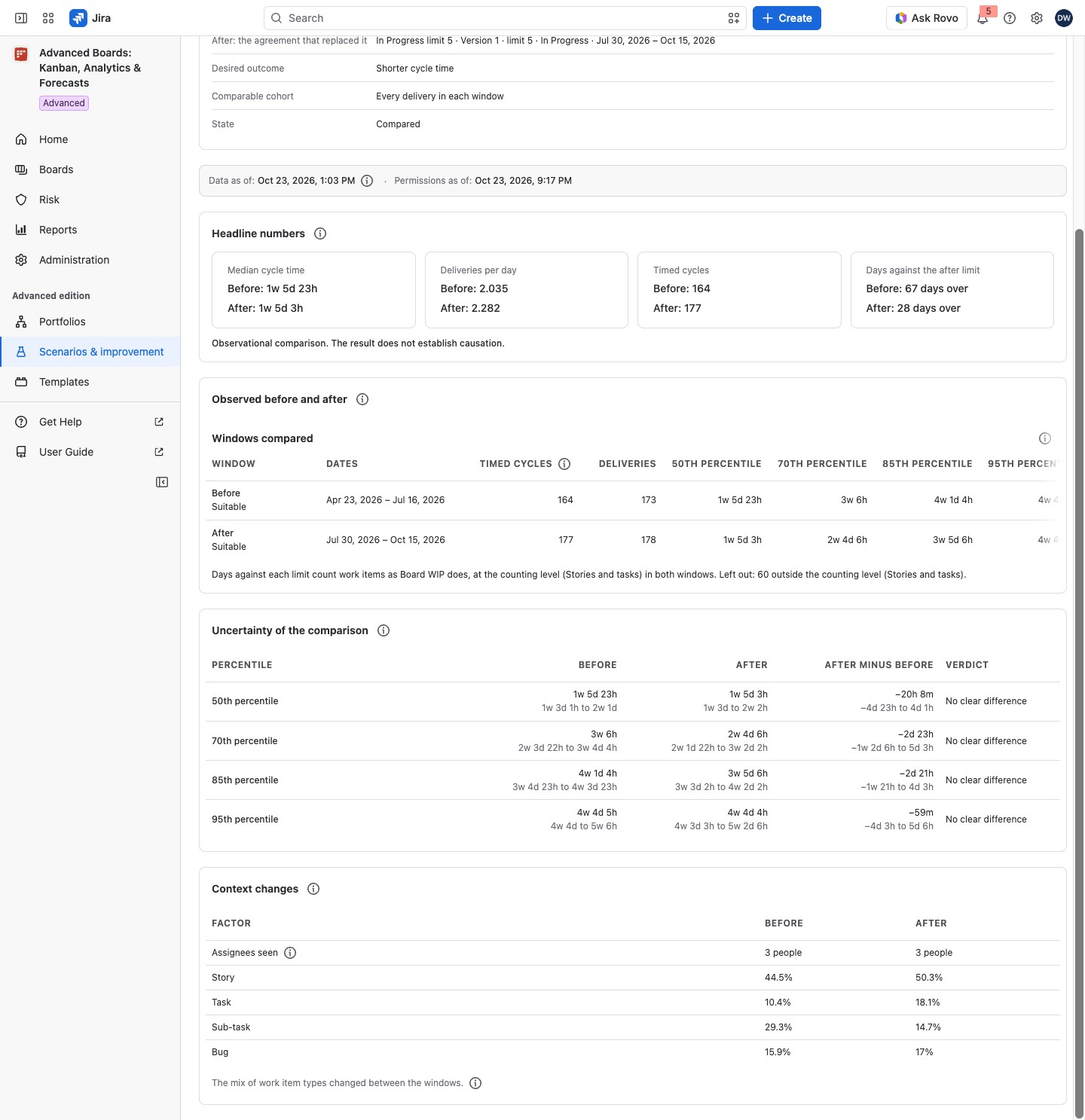
For example, Checkout’s In Progress column ran under the agreement In Progress limit 8, then under In Progress limit 5. The experiment In Progress limit from 8 to 5 names the first as the before side and the second as the after side. The comparison then shows each window’s median cycle time and deliveries per day, and the verdict says whether the difference is clear.
What you can set #
| Field | What it holds |
|---|---|
| Name | Up to 200 characters |
| Hypothesis | Up to 1,000 characters |
| Desired outcome | “Shorter cycle time”, “More deliveries per day” or “Work in progress inside the agreed limit”; it decides no verdict |
| Agreement | A work-item-count agreement over the board or a column; both sides cover the same one |
| From, To | Local dates in the flow’s time zone, both days included; at most 366 days a window |
| Comparable cohort | Optional: narrows both windows to work items by their current status and work item type. Delivered work items usually sit in a done status, so a status before done matches few deliveries |
Edit or delete an experiment #
On the experiment’s page, a Board owner of its board selects Edit, changes the definition and selects Save changes. Other people see Edit and Delete held.
Delete asks “Delete In Progress limit from 8 to 5?” and says how many saved comparisons go with it. Select Delete experiment. The board, its agreements and its work items stay. This cannot be undone.
Compare the two windows #
On the experiment’s page, select Compare the windows. The app reads the board’s history for both windows. The result is explained in Read an experiment’s comparison.
Experiment definition keeps what you recorded. Last saved comparison names the day and windows compared. A later change of a window or limit marks the figures out of date. Select Compare again.
How it relates to the board #
An experiment reads the agreements under the board’s Configure → “Policies & agreements”. It changes nothing on the board or in Jira. A saved comparison is kept for up to 360 days. There is no export.
If something looks off #
- “An experiment is recorded on a board you own, and you own none yet: create a board first.”: create a board or ask for the Board owner role.
- “This agreement version can’t be compared”: a Board owner chooses the agreement again in Edit.
- “This board has no agreement yet.”: a Board owner selects Agree one to write it first (Policies and WIP limits).


