A comparison sets the board’s history in the before window beside the after window. It tells you whether cycle time and deliveries moved, how sure that is, and what else changed at the same time.
Run a comparison #
- Open Scenarios & improvement, then Open policy experiments.
- Select the experiment’s name.
- Read the Experiment definition card first. It is what the comparison measures.
- Select Compare the windows.
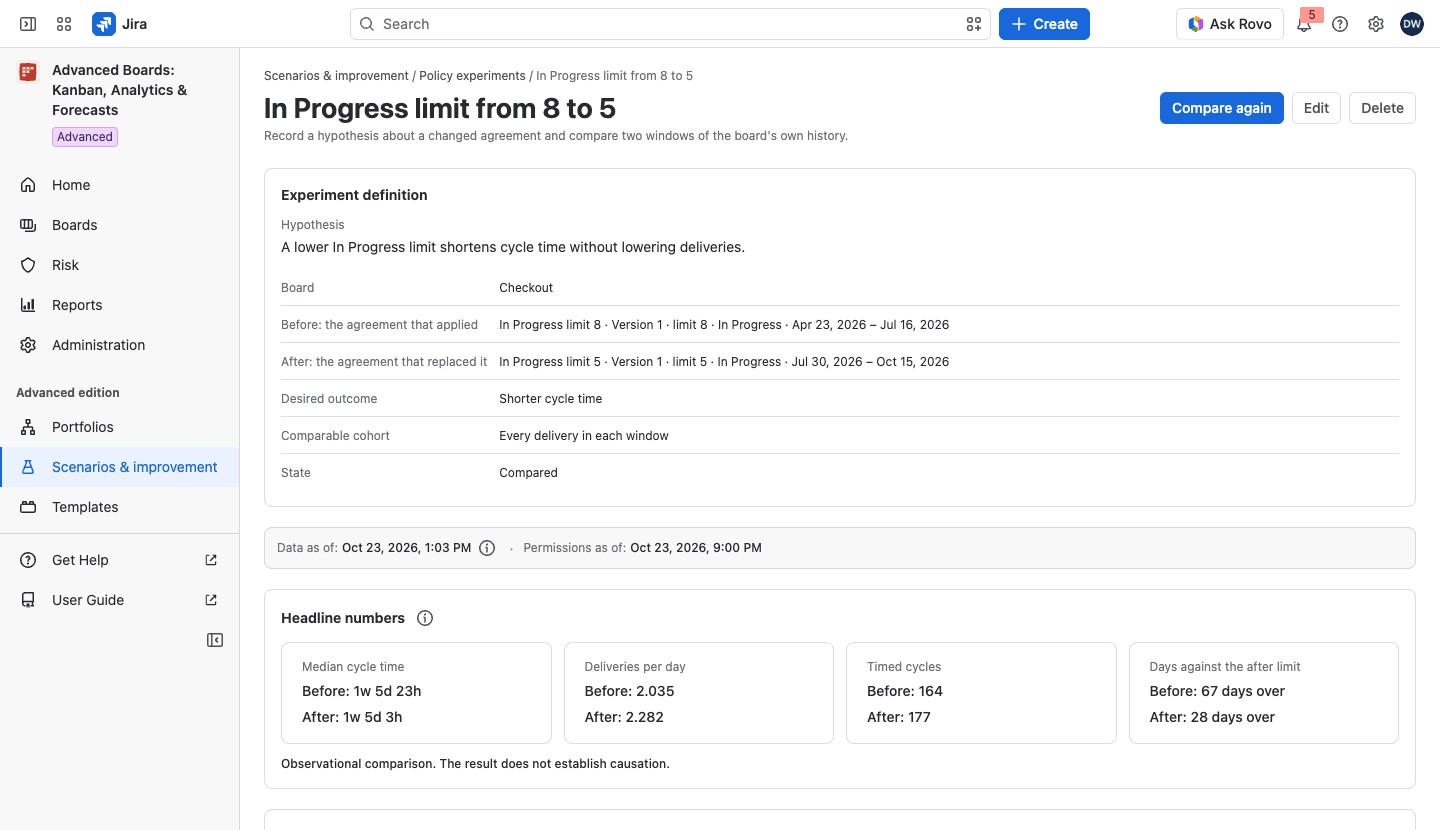
The Experiment definition card holds the Hypothesis and these rows: Board, Before: the agreement that applied, After: the agreement that replaced it (each with its window’s dates), Desired outcome, Comparable cohort and State. The state is plain text: “Recorded”, “Compared” or “Closed”. The desired outcome is recorded with the hypothesis; it changes no number and decides no verdict.
The page header holds three actions:
- Compare the windows, or Compare again once a comparison is saved: shown on the Advanced edition. While a newer version of the experiment is being read after a conflict, it is held with “The newer version is being read. Wait for its answer.”
- Edit: shown on the Advanced edition. It opens the definition in a dialog.
- Delete: on every edition.
Edit and Delete are held for anyone who is not a Board owner of the experiment’s board: “Only a Board owner of this experiment’s board can change or delete it.” While your role is read they say “Reading your role on this experiment’s board…”, and if it cannot be read, “Your role on this experiment’s board could not be read, so it cannot be changed from here.”
Select Delete to open a dialog titled with the experiment’s name, such as “Delete In Progress limit from 8 to 5?”. It says “The experiment and its saved comparisons are deleted. The board, its agreements and its work items are untouched.”, how many saved comparisons go with it, and “This cannot be undone.” Select Delete experiment to confirm.
The app reads the board’s history for both windows. A strip above the result names the cohort, the flow and calendar versions and when the comparison ran. Then:
- Headline numbers: four tiles, each before and after: Median cycle time, Deliveries per day, Timed cycles and Days against the after limit (“9 days over”, or “No maximum agreed”).
- Observed before and after, with the table Windows compared: one row for each window, with these columns:
- Window: “Before” or “After”, and the window’s suitability (below);
- Dates: the window’s first and last day;
- Timed cycles: the delivered cycles the percentiles are read from, so a work item delivered again after a reopen counts each time. Its (i) About timed cycles says so;
- Deliveries: proven first deliveries only;
- one column for each percentile, such as 85th percentile;
- Deliveries per day;
- Days against the before limit and Days against the after limit, such as “2 days over the limit · 1 at it · 60 measured”, or “No maximum agreed, so no day is over one.” where a side agrees no limit;
- Exclusions, by reason, such as “Committed but not yet delivered”, “Part of the cycle is outside retained history” or “Closed as not delivered”.
The (i) About the percentile columns says each column is read by nearest rank: the 85th percentile is the value that 85% of the window’s values are at or below. The (i) About how long a comparison is kept, beside the card’s title, gives the keep time. A line under the table says how the days against each limit were counted, such as “Days against each limit count work items as Board WIP does, at the counting level (…) in both windows.” It adds the work items Board WIP leaves out, with their reasons.
A window marked Experimental (yellow) has a small sample or a short history. Its (i) About an experimental window says the number is still measured and not wrong. Otherwise it reads Suitable as plain text, with no lozenge.
- Uncertainty of the comparison: the columns Percentile, Before, After, After minus before and Verdict. Each interval is a range that holds the true percentile in at least the confidence the (i) About the intervals names; a small sample gives a wide interval or none. The difference is a “Clear difference” when its interval excludes zero, “No clear difference” when it does not, and “Too few to tell” when a window has too few values. A window with too few values at a level reads “Empty or too few for an interval”, and its difference reads “Not stated”. A comparison saved before the intervals existed reads “No uncertainty statement”; on Advanced, select Compare again for one.
- Context changes: the flow, calendar and layout versions, marked “(changed)” when they differ, the Assignees seen (a count of people, never capacity) and the mix of work item types, as a share per type. The types come from the current type recorded when the comparison ran, not from the mix at the time. A type Jira does not show you reads “Unknown work item type”; a type missing from one window reads “Not in this window”. The card says “The mix of work item types changed between the windows.” or “The mix of work item types is the same in both windows.” Assignees seen can read “Unavailable”, with “The live count of people seen did not finish, so it is unavailable. Every measured number above still stands.”
The card says “Observational comparison. The result does not establish causation.” The result is based on what happened, not a controlled test. It doesn’t prove that the new limit caused the change, because other things may have changed too.
For example, the comparison of In Progress limit from 8 to 5 on Checkout gives each window’s median cycle time and deliveries per day under Headline numbers. If the after window’s median is shorter and the verdict reads “Clear difference”, the lower limit went with shorter cycles. Read Context changes before you credit the limit: a changed flow version or a different mix of work item types may explain part of it.
Keep and repeat a comparison #
After a refused compare, or when a window or an agreement limit changed since, the card Last saved comparison appears above the figures. It names the day and both windows and, in a warning, which window or limit changed. On Advanced, select Compare again for figures that match the experiment now. The page shows the latest comparison; when more than one is kept, a line under it reads “2 saved comparisons”, for example. A saved comparison is kept for up to 360 days. There is no export.
When no comparison is shown, the result card reads one of these:
- No comparison yet: nothing was compared; on Advanced it says “Comparing reads the board’s retained history for both windows and keeps the result.”
- Comparison withheld: the saved comparison names work you cannot read now, so it is withheld whole rather than recounted.
- Comparison no longer kept: the latest comparison passed its retention period.
- Comparison unreadable: the saved comparison could not be opened.
On Advanced, select Compare again to replace it. On Standard there is no Compare, and with nothing saved the page says “No comparison was saved for this experiment.”
On the Standard edition #
The experiment carries the gray lozenge Retained result: produced under the Advanced edition. After a line that names this installation’s edition, it says “The experiments you have stay readable and can be deleted; a saved comparison stays readable within its retention period. New experiments and new comparisons need the Advanced edition.” Compare and Edit are absent; Delete stays.
If something looks off #
- “SLE not set; comparison not performed.”: agree a service level expectation on the board; a Board owner sees Set it on the message.
- “A status this cohort names holds no work item you can see on this board, so none matches it.”: choose other statuses in Edit.
- “A work item type this cohort names is one Jira does not show you or no work item on this board has, so no work item you can see matches it.”: choose other work item types in Edit.
- “The before window starts before this board’s complete history”: start the before window on or after the date named.
- “A window is not over in this board’s data yet”: compare again once the last day of both windows has passed.
- “This experiment holds as many of your comparisons as it can” or “You keep as many comparisons as one person can”: one person keeps up to 20 comparisons of one experiment and 200 in all. One of yours frees room when it expires, up to 360 days after it was made. A Board owner can also select Delete experiment.
- “Comparison withheld”, “Comparison unreadable” or “Comparison no longer kept”: on Advanced, select Compare again to replace the saved one; on Standard, no new comparison can run.


