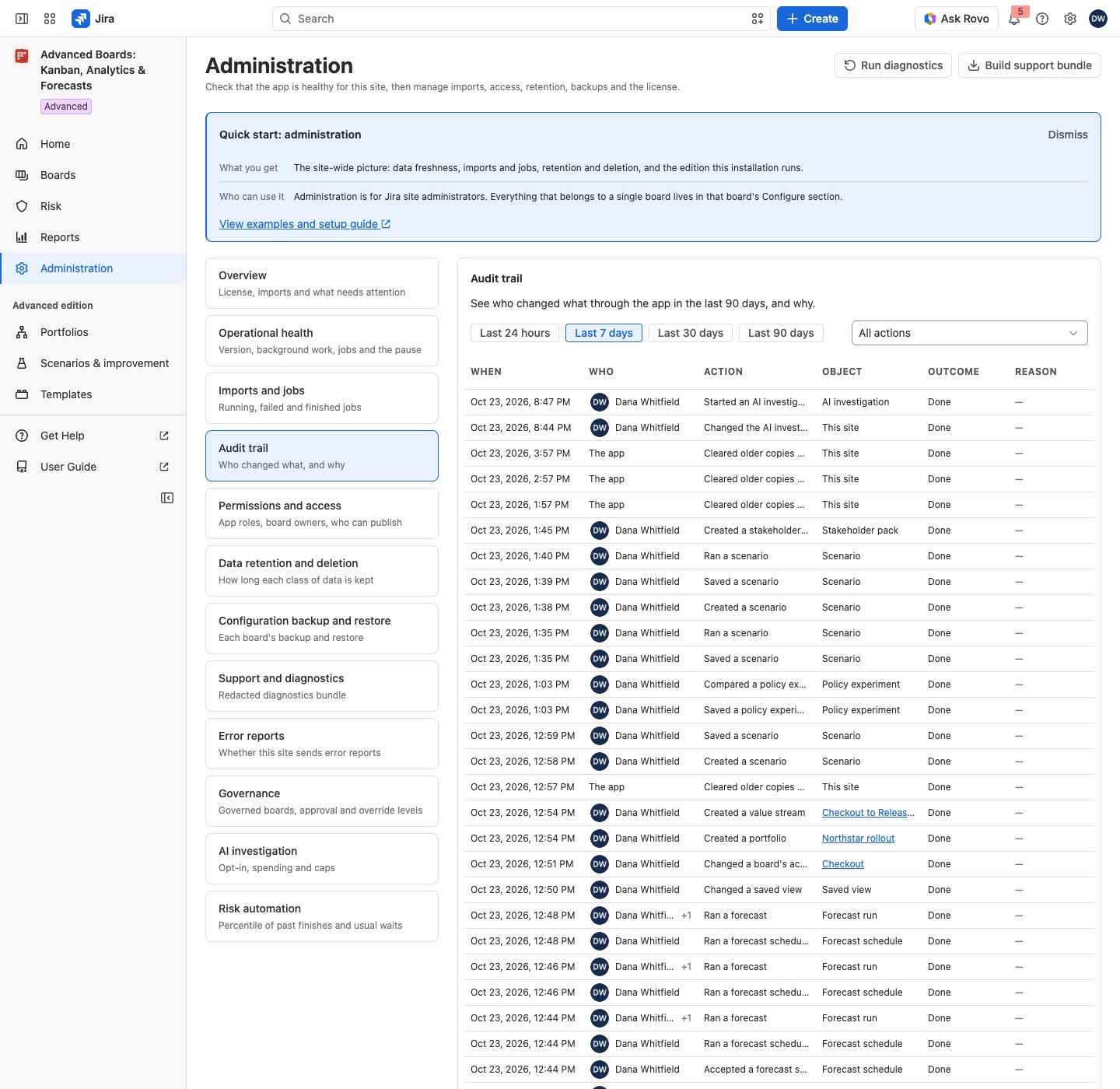
The audit trail lists the changes made through the app on this site in the last 90 days: who made each one, what it changed, how it ended and the reason given. It answers “who changed this board, and why?”. It is part of every edition.
Open the audit trail #
Open Administration, then select Audit trail in the section list. Its hint reads “Who changed what, and why”. The newest change comes first.
Filter the list #
Period is a row of chips; Action is a menu.
- Period: Last 24 hours, Last 7 days, Last 30 days or Last 90 days (the default).
- Action: All actions, or one group: Boards and work items, Board configuration, Portfolios, Templates and rollouts, Rules and alerts, Forecasts, scenarios and experiments, AI investigation or Administration.
Each group holds these changes:
| Group | What it holds |
|---|---|
| Boards and work items | Creating, editing and deleting a board, importing it again, its access, its plan settings and milestones, and the Jira changes made from a board (create, move, edit, rank, sprint, backlog, links, assignee) |
| Board configuration | The flow, the calendar, policies, saved views and restores of a configuration backup |
| Portfolios | Portfolios, value streams and stakeholder packs |
| Templates and rollouts | Templates, their approval and publication, rollouts, retries, rollbacks and Governance saves |
| Rules and alerts | Rule changes, ownership, acknowledging a risk signal, and the alerts the app raised, reopened or resolved |
| Forecasts, scenarios and experiments | Forecast runs, schedules and their pauses, backtests, scenarios and policy experiments |
| AI investigation | Investigations and the AI investigation settings |
| Administration | Retention, deleting app data, support bundles, permissions, pausing changes, risk automation, error reports, and jobs canceled or resumed |
Every group is listed on every edition. A group with no change in the period reads “No matching changes”.
Select Show more at the foot of the list for older rows.
Read a row #
| Column | What it says |
|---|---|
| When | The time of the change |
| Who | The person, or “The app” for work it did by itself. For a schedule or rule a person owns, the cell shows that person and “+1”; point at “+1” to read “The app, for” and the name |
| Action | In plain words, such as “Saved a policy”, “Published a template” or “Changed a work item’s status” |
| Object | The object’s name, such as Checkout, or its kind, such as “Board”, when it has no name; a deleted object is marked “Deleted” |
| Outcome | “Done” as plain text; “Refused” or “Failed” in red; “Conflict”, “Unknown” or “Needs review” in amber; “Requested” in blue; “Observed” in gray |
| Reason | The reason the person typed, where the action asks for one |
What each outcome means:
- Done: the change went through.
- Refused: a rule, a permission or Jira said no, so nothing changed.
- Failed: the change could not be made.
- Conflict: someone changed the object first, so this change was not saved.
- Unknown: Jira did not answer in time, so the outcome was not known when the row was written.
- Observed: a later read of Jira found that the change was made.
- Needs review: a later read could not tell, so a person should check the object in Jira.
- Requested: the deletion of all app data was asked for; it runs as a job.
Jira changes made through the app, such as a status change from Work, are recorded too. A change made in Jira itself is not. A board’s name is a link to the board, and on the Advanced edition a portfolio’s, a value stream’s or a template’s name is a link too. A personal saved view is never named: it reads “Personal saved view”.
What is kept #
The trail holds the actor, the action, the object, the outcome and the reason. It holds no text of a work item, no JQL and no token. Rows are kept for up to 90 days. Delete all app data removes the trail too and leaves one closing record of the deletion (Data retention and deletion). The audit trail has no export of its own. A support bundle carries the newest audit rows for a ticket (Support and diagnostics).
If something looks off #
- A warning above the table, and the Overview row “Changes missing from the audit trail”: some changes are not in the trail. The lozenge Catching up means the changes are “not in the audit trail yet”, and the app tries every hour to add them. Incomplete means some “could not be written” and will not come back. The actions themselves were not affected. The same row shows on Operational health (Operational health and pausing changes).
- “Nothing recorded in this period”, with “Changes made through the app appear here, with who made them and when.”: no change was made through the app in that period. Choose a longer Period.
- “No matching changes”: no change of the chosen kind was recorded in this period. Choose All actions.
- “Name not recorded”: the object was deleted before the app kept names, or more than 90 days ago, so the row cannot name it.
Who can open it #
Only a Jira administrator can open Administration and read the audit trail.


