You’ve built a dashboard, it looks great, you send the link around. Then half the team reports empty gadgets. This is almost always the same thing, and it takes a minute to fix.
Why it happens #
Gadgets read work items live from Jira, as the person looking at the dashboard. If the Jira filter underneath isn’t shared with someone, there’s nothing to show them, regardless of who built the advanced filter or who can open the dashboard.
They’ll see the reason on the gadget itself: “The advanced filter is built on a Jira saved filter that is not shared with you… Ask the filter owner to share it with your user or group.”
In place of the table, the gadget’s body carries the heading Jira does not share this filter’s work items with you and that sentence. The gadget’s title, its toolbar and its configuration stay, so an editor can still open the form and read which Jira filter it is built on.
Fixing it #
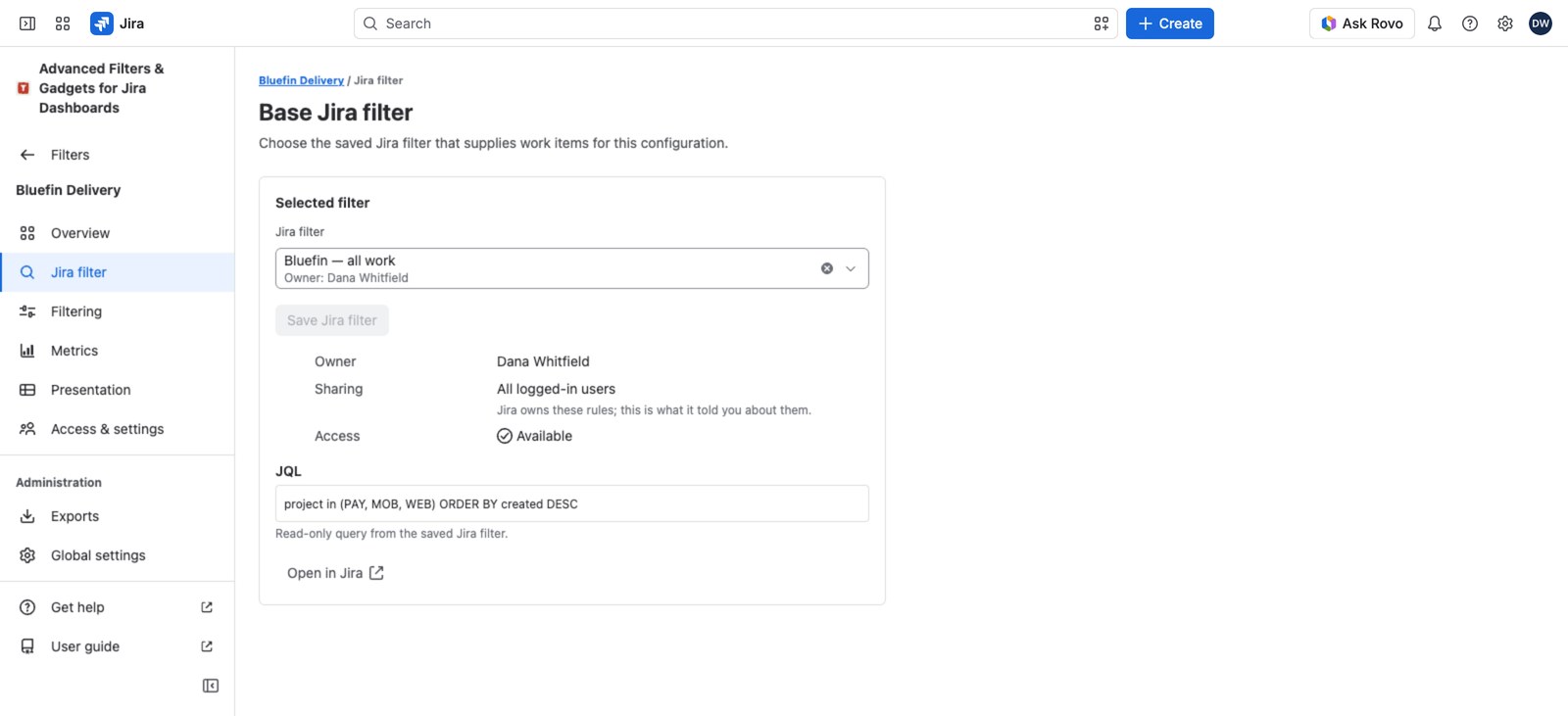
- Open your advanced filter and go to the Jira filter section.
- Check the Selected filter card for the owner and the current sharing rules. This tells you who to ask and who’s already covered.
- Select Open in Jira.
- In Jira, the filter’s owner (or a Jira admin) adds the users or groups who need it.
That’s it: nothing in this app needs changing. The moment Jira shares the filter, every advanced filter and gadget built on it works for those people.
Two people, same filter, different rows #
Sharing the filter grants use of the saved search. Jira’s space and work item permissions still apply on top, so two colleagues who both have the filter shared can legitimately see different work items in the same gadget. Nothing is broken.
Is it sharing, or something else? #
If the wording doesn’t mention a filter owner, you’re looking at a different problem. Here’s how to tell them apart:
| If the message mentions… | It’s a… | Fix it |
|---|---|---|
| the filter owner, or “share it with your user or group” | Jira sharing problem | In Jira, on the saved filter |
| a Jira administrator, or a policy like Create advanced filters | App permission problem | In Global settings → Access policies |
| “Advanced Filters is not licensed” | Licensing problem | Check your subscription in Atlassian |
They don’t substitute for each other: sharing a Jira filter does nothing for a missing app permission, and granting an app policy does nothing for an unshared Jira filter.
Related #
- The Jira filter behind an advanced filter: what the Jira filter section shows, and how to swap the source.
- The filter library: what Source access needed means on a list row.


